
Introduction
We spend most of our time at Altreonix building custom internal software for small and mid-market businesses, so we have a natural bias here. We’re upfront about that. But we also spent weeks pulling real 2025-2026 market data, platform documentation, and migration case studies before writing this, because we wanted our position to hold up against actual evidence, not just our own preference for custom code.
Here’s what we found. No-code tools are genuinely excellent for a specific window of a business’s life. Then, for a meaningful number of businesses, that window closes, and the same platform that got them to product-market fit starts working against them. The businesses that recognize this early migrate cheaply and calmly. The ones that don’t end up paying much more, much later, under much worse conditions.
This post lays out where that line sits, what the data actually shows about crossing it, and how to think about your own timeline.
The No-Code Boom Is Real, and It’s Not Slowing Down
No-code and low-code adoption has grown fast enough that dismissing it as a toy for non-technical founders is no longer a credible position. A 2026 global market report from The Business Research Company puts the no-code development platform market at $35.61 billion in 2025, growing to $45.24 billion in 2026 at a 27.1% compound annual growth rate, with projections stretching well past $100 billion by the end of the decade.
Gartner’s own forecasts back this up at the enterprise level. Kissflow’s 2026 statistics roundup, drawing on Gartner data, notes that roughly three-quarters of new applications will be built on low-code or no-code platforms by 2026, up from less than a quarter in 2020, with the large majority involving non-developer citizen builders.
Small businesses are catching up fast too. WorldMetrics’ industry report cites that 78% of small businesses with 10 to 49 employees now use no-code tools for workflow automation, and that adoption among SMEs has more than doubled in a few years. This isn’t a passing trend. It’s infrastructure now, the same way cloud hosting or SaaS subscriptions became infrastructure a decade ago.
Where No-Code Genuinely Earns Its Place
We want to be clear that this post is not an argument against no-code as a category. Early stage, no-code is often the correct decision, not a compromise.
If you’re validating a business model, running a departmental workflow, or building an internal tool used by a handful of people, tools like Bubble, Airtable, Glide, Softr, and Webflow let you ship in days instead of months, at a fraction of custom development cost. That speed has real value. It lets you learn whether the thing you’re building matters before you spend real engineering budget on it.
The tension isn’t “no-code versus custom.” It’s that a growing share of businesses eventually cross a threshold where the same tool that gave them speed starts imposing real limits on their operations, and staying past that threshold has a cost that compounds the longer it’s ignored.
The Ceiling Nobody Warns You About
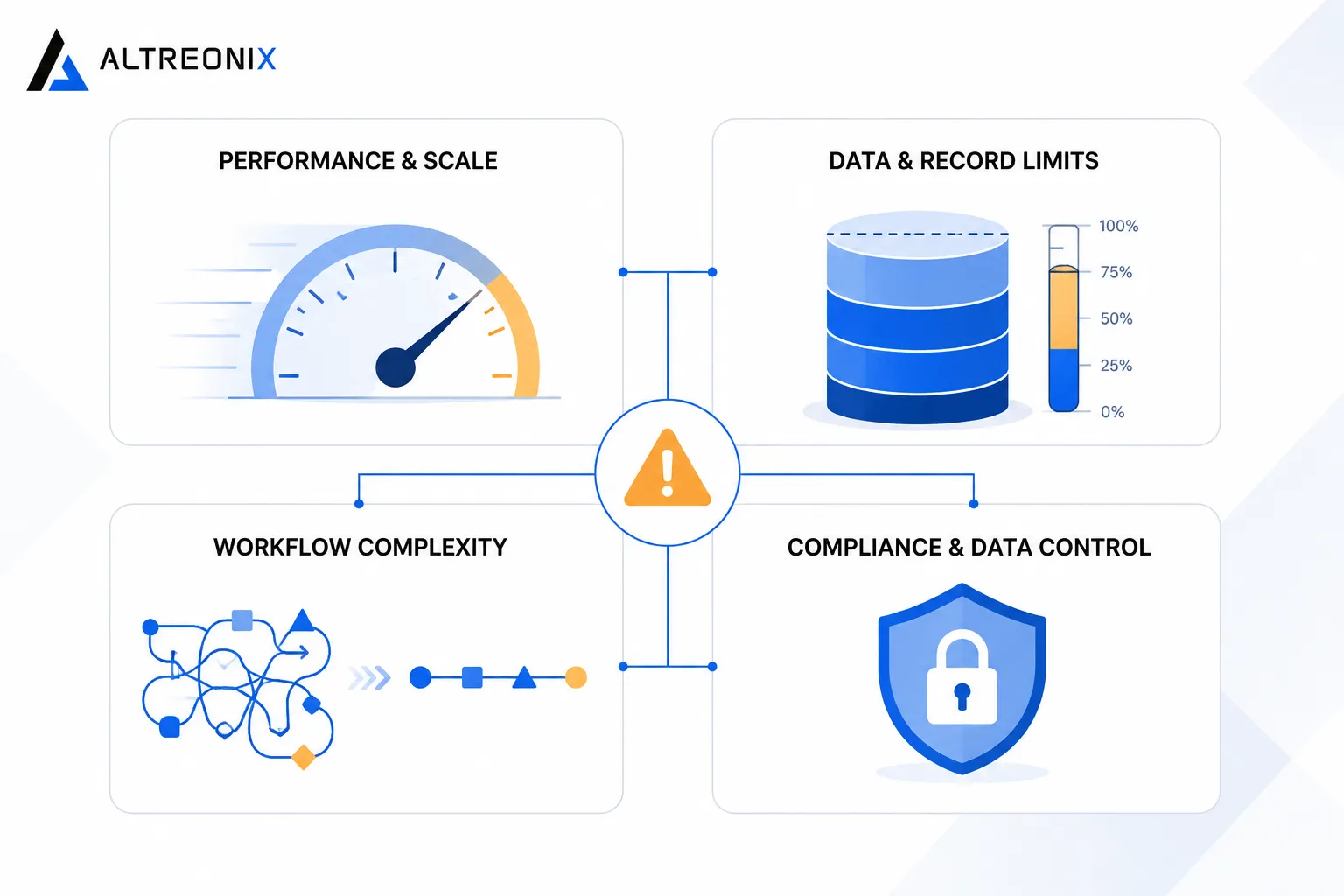
The friction doesn’t usually show up as one dramatic failure. It shows up gradually, and it clusters around a few recurring categories.
 ### Performance and Scale
As user volume and data grow, no-code apps commonly slow down in ways that are hard to fix from inside the platform. A widely discussed case study from Meerako describes a Bubble-built startup that migrated to a custom Next.js, Node.js, and PostgreSQL stack after hitting slow page loads under growing user volume, brittle complex workflows, and limited control over infrastructure needed for further scaling. After the rebuild, the same product saw over a 70% reduction in load times and roughly 100 times the prior user capacity.
Veld Systems’ migration guide goes further, noting that Bubble apps under real load commonly see load times climb past five seconds with no ability to optimize queries or add caching at the infrastructure level, since that layer isn’t exposed to the builder. Separate scaling analyses of Bubble specifically point to slow searches, inefficient workflows, and rising workload unit costs as the pattern that shows up as apps grow past their early stage.
Data and Record Limits
Airtable and similar platforms cap how much data a workspace can hold before you need a higher tier or a different tool entirely. Airtable’s own plan documentation lists per-base record caps of 1,000 on the Free plan, 50,000 on Team, 125,000 on Business, and 500,000 or more on Enterprise Scale, with attachment storage scaling alongside from 1GB up to 1TB. API access is capped too, at five requests per second per base regardless of plan, which becomes a real constraint once a base is powering live operations rather than a spreadsheet replacement.
Glide and Softr follow a similar shape. Glide caps data at 25,000 rows on its Free and Explorer tiers, 50,000 on Maker, and 100,000 on Business, pushing anything larger into a separate high scale data source. Softr gates more on records and named app users, with its Professional tier allowing 500,000 records and 100 app users, and Business stepping up to 1 million records and 500 to 1,000 app users. In both cases, the jump from this plan works to we need the next tier tends to arrive faster than businesses plan for, because record growth compounds with customer growth.
Workflow and Integration Complexity
No-code workflow engines are built for common patterns. Once your business logic branches into enough conditional paths, exception handling, and third-party integrations, the visual workflow builder itself becomes the bottleneck. Veld Systems describes real client stacks running 15 or more Zapier integrations stitched between Airtable, Bubble, and Mailchimp, where a failure anywhere in that chain breaks the entire workflow, and where the team ends up spending more time maintaining the stitching than building anything new.
Compliance and Data Control
For businesses moving into healthcare, finance, or any regulated space, compliance becomes a hard wall rather than a soft inconvenience. Bubble’s own documentation on infrastructure and compliance confirms SOC 2 Type II and GDPR support, but Bubble does not sign HIPAA Business Associate Agreements, which rules it out for apps that need to be formally HIPAA-compliant without significant architectural workarounds. Kissflow’s own security and compliance guide for the category makes a similar point more broadly: enterprises and regulated industries increasingly expect SOC 2, ISO 27001, and regional privacy certifications that many no-code vendors either don’t offer or only offer on custom enterprise contracts.
How the Major Platforms Actually Compare at Scale
Pricing pages rarely show the full picture, because the real constraints usually sit in the fine print around records, users, and API limits rather than the sticker price. Here’s how the platforms most commonly used for real business operations compare once you’re operating past the early, low-volume stage.
| Platform | Mid-tier plan cost | Record or row limit | Notable ceiling |
|---|---|---|---|
| Bubble | Roughly $119 to $349 a month (Growth to Team) | No hard record cap, but workload units meter usage and costs rise with traffic | Workload unit overages and plugin costs compound quickly under real traffic |
| Airtable | Roughly $20 to $45 per seat monthly (Team to Business) | 50,000 to 125,000 records per base | Five requests per second API limit regardless of plan |
| Glide | Roughly $60 to $249 a month (Maker to Business) | 50,000 to 100,000 rows | Larger datasets forced into a separate high scale data source |
| Softr | Roughly $139 to $269 a month (Professional to Business) | 500,000 to 1,000,000 records | App user caps force plan jumps as customer base grows |
| Webflow | Business site plan | Not record based, page and traffic based instead | 2,000 form submissions and 500,000 pageviews per month on standard plans |
None of these numbers are a problem on day one. They become a problem when your business has grown enough that hitting them is a matter of when, not if, and the cost of the next tier stops looking like a rounding error.
Vendor Lock-In: The Part Nobody Budgets For
Even when a business is willing to pay for the next pricing tier, there’s a separate question that gets far less attention: how portable is what you’ve actually built.
Bubble is explicit about this in its own FAQ and community forum. Bubble apps cannot be exported as runnable source code. Only the underlying data can be exported, typically via CSV or API, which means the actual application logic, workflows, and UI have to be rebuilt from scratch if a business ever needs to leave. Independent analyses from BubbleXport and BKND Development reach the same conclusion, describing Bubble’s export options as sufficient for a data backup but not for anything resembling a real migration path. A separate technical breakdown of Bubble’s lock-in mechanics makes the practical point directly: the more custom workflows, database structures, and UI components a team builds inside Bubble, the more expensive and time-consuming it becomes to leave later, especially if Bubble changes pricing or policy in the meantime.
This is worth sitting with for a moment. It means the cost of migrating isn’t fixed. It grows every month you keep building inside a platform you can’t fully export from, because every new feature adds to what eventually has to be rebuilt rather than exported.
When the Platform Itself Goes Down
There’s a third category of risk that’s easy to overlook until it happens: you don’t control the infrastructure your business runs on.
Webflow’s own incident reports describe a database cluster hitting an undocumented capacity limit during an April outage, taking the dashboard, designer, hosted websites, form submissions, and APIs offline for a portion of customers for most of a business day. A separate incident months later, described by Webflow’s leadership as a coordinated attack overwhelming backend systems, made it difficult for many users to log in or use the platform at all. Bubble has had its own version of this too, with an outage postmortem describing an AWS-forced database upgrade that caused editor downtime and the loss of unsaved editor changes during a multi-hour window.
None of these incidents suggest the platforms are poorly run. They’re evidence of something more structural: when your operations run on infrastructure you don’t control and can’t directly monitor or fix, an outage on the vendor’s side becomes an outage on your side, with no lever on your end to shorten it.
Real Businesses That Hit the Wall
These aren’t hypothetical scenarios. Veld Systems’ migration guide walks through multiple anonymized businesses that moved off Bubble, Airtable, and Zapier combinations once cost and complexity outpaced the platforms’ value, with typical rebuild timelines of eight to twelve weeks and $30,000 to $60,000 for standard applications, extending to twelve to sixteen weeks and $50,000 to $100,000 for more complex systems.
TechVinta’s 2026 migration guide breaks the cost down further by scenario. A simple Bubble to Rails migration for a straightforward SaaS product runs roughly $15,000 to $25,000, a Bubble to Rails and React marketplace rebuild runs $40,000 to $70,000, and a full multi-tool stack migration involving Bubble, Zapier, and Airtable together typically lands between $80,000 and $120,000.
It isn’t only Bubble businesses making this move. Idealogic’s account of leaving Webflow describes rebuilding their own site as code once they hit limits around customization, performance, and long-term control that Webflow’s visual builder couldn’t accommodate. AISurvivors published a similar account of moving from Webflow to Next.js, framing the migration as a deliberate trade of short-term convenience for long-term flexibility once their site’s requirements outgrew what a page builder was designed for.
The pattern across these case studies is consistent. The businesses that migrated proactively, before the platform became a daily operational drag, spent less and disrupted their operations less than the ones who waited until something broke.
The Cost of Waiting Too Long
This is the part that surprises people who assume no-code stays cheap indefinitely. It doesn’t. No-code platforms price on usage dimensions like records, seats, workflow actions, and API calls, which means cost scales with your growth in a way flat custom hosting often doesn’t.
Veld Systems’ cost comparison illustrates this well. At roughly 10,000 users, custom infrastructure hosting commonly runs in the range of $50 to $200 a month, while an equivalent Bubble application running the same workload often costs $500 to $1,000 a month. That gap only widens as usage climbs, and it doesn’t include the third-party tools most growing no-code stacks end up bolting on to cover gaps in the core platform.
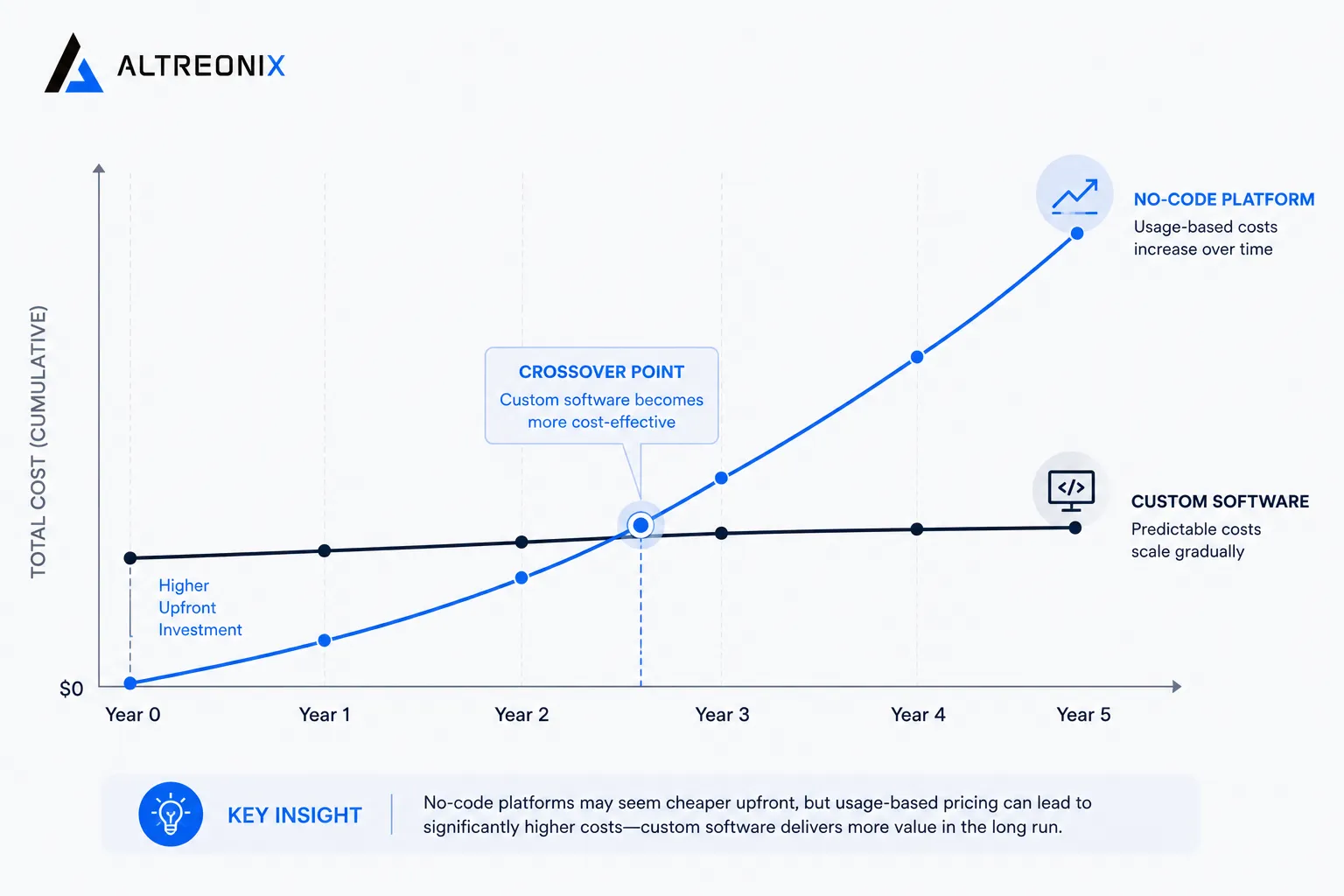 A real example makes this concrete. A migration specialist documented a client’s full no-code stack, Bubble, Xano, Memberstack, Zapier, Twilio, and SendGrid combined, that added up to $2,536 a month once every tool was counted, not just the $529 a month Bubble line item on its own. Once workaround development time was included, the true annual cost of staying was closer to $102,000 a year. After migrating to custom infrastructure, hosting dropped to roughly $160 a month, and the business reported net savings of about $76,000 a year with a payback period of six to seven months.
To be fair to the other side of this argument, Forrester’s Total Economic Impact research finds a 342% three-year ROI and a 40% reduction in maintenance costs for typical low-code and no-code adoption. That research is real and shouldn’t be dismissed. It just doesn’t model what happens specifically at the point where a business outgrows the platform, which is the exact gap the migration case studies above fill in.
So Should You Migrate?
Not every business needs to. The question isn’t whether no-code is bad, it’s whether your business has crossed the specific thresholds where staying costs more than moving.
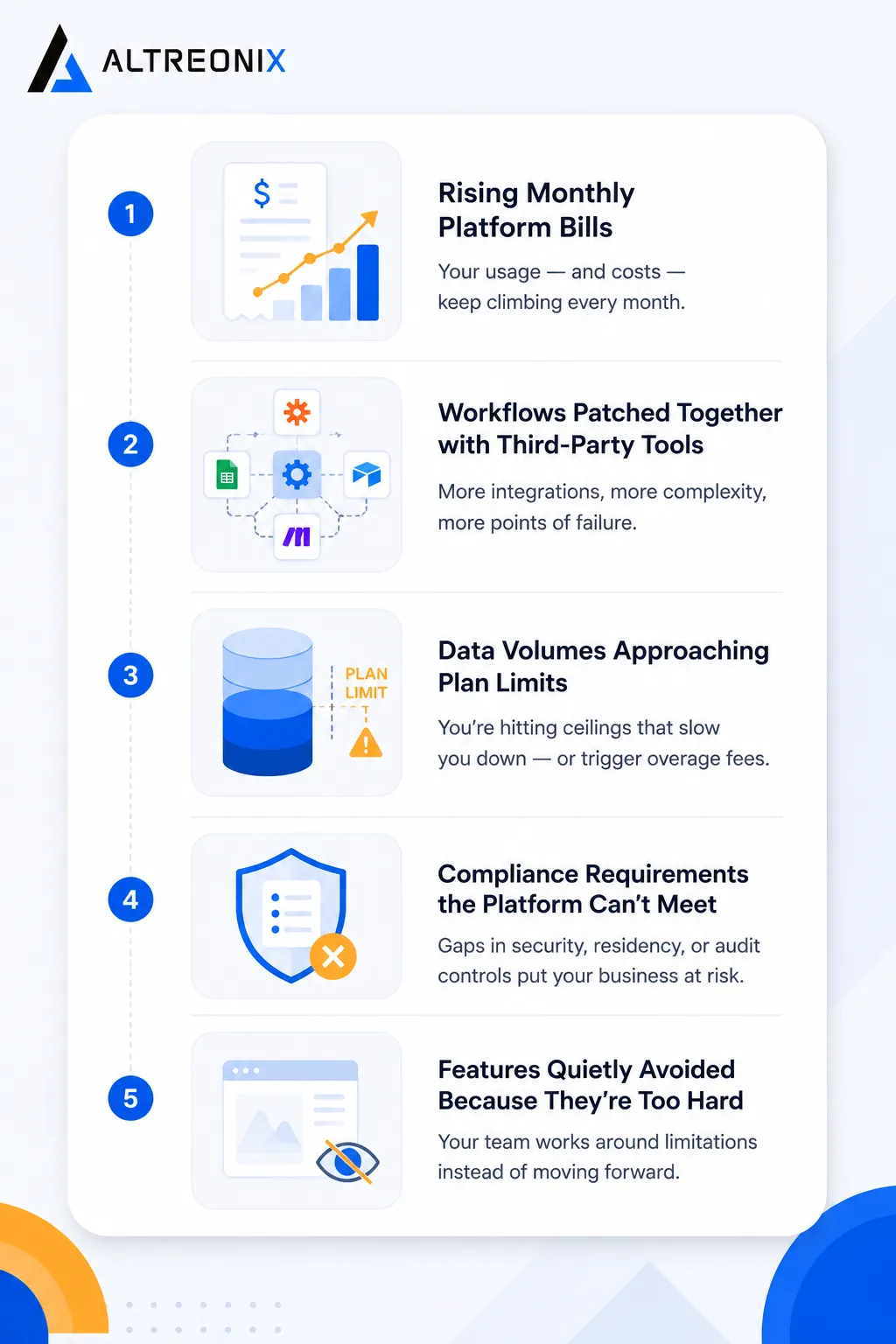 A simple way to think about it is to check your situation against the categories that actually drive the decision, rather than a vague feeling that things have gotten harder.
| Signal | What it usually means |
|---|---|
| Monthly platform bill rising faster than revenue | You’re paying for growth on a usage-metered platform instead of flat infrastructure |
| Workflows increasingly patched with third-party tools | The core platform’s logic engine has hit its practical ceiling |
| Data volumes approaching plan limits | The next forced upgrade is a matter of when, not if |
| Compliance requirements the platform can’t meet | This becomes a hard blocker with regulated clients or partners, not a negotiable trade-off |
| Features you’ve quietly stopped building | The platform is shaping your roadmap instead of your business needs shaping it |
If you’re seeing two or more of these consistently, it’s worth treating the question seriously rather than deferring it another quarter. We break these signals down further, with concrete per-platform thresholds, in our companion diagnostic post for this cluster.
The Honest Case for Staying on No-Code
We’d be overstating our case if we pretended migration is always the right call. A March 2026 audit-based analysis of over 300 Bubble apps found that many founders who believe they’ve outgrown Bubble are actually hitting developer skill ceilings rather than genuine platform limits, and that apps rebuilt correctly inside Bubble often don’t need to migrate at all. Continuum’s own CTO guidance makes a similar point: migration is premature while a product is still evolving, while problems are solvable through better optimization, or while capital would clearly be better spent on sales and growth than on a rebuild.
There’s also real evidence that no-code can support serious scale when paired thoughtfully with the right backend. One documented case describes rebuilding a social bookmarking platform with 7.8 million users and around 60 million posts on Bubble paired with Xano for backend workloads and a custom Cloudflare layer for redirects and sitemaps, successfully handling millions of redirects and multi-million-page sitemaps. Bubble’s own case study catalog lists a vertical SaaS company that raised a $3 million seed round and reached $700,000 in annual recurring revenue serving 30,000 daily users, entirely on Bubble.
The pattern in these success stories is fairly consistent: internal tools, departmental workflows, and bounded-user-base applications where the business’s real complexity stays within what the platform was designed to handle. WorldMetrics’ industry data shows a meaningful share of small businesses using no-code tools for workflow automation report measurable revenue gains within a year, and for businesses in that category, rebuilding custom would be spending money to solve a problem they don’t have.
The honest test isn’t the tool you’re using. It’s whether your operations have outgrown it.
How We Think About This at Altreonix
We build custom internal software and business systems for companies that have reached, or are approaching, this threshold. Our Web Applications and Business Systems work usually starts with an honest audit of what the existing no-code or low-code stack is actually costing a business, in dollars and in constrained growth, before we recommend anything.
If you’re not sure which side of the threshold you’re on, that’s a reasonable place to start a conversation with us.