Introduction
Our previous articles covered why businesses outgrow no-code platforms, what breaks as they scale, and what it actually costs to move. This post focuses on the next question: how to execute that migration without turning it into a painful, high-risk rebuild.
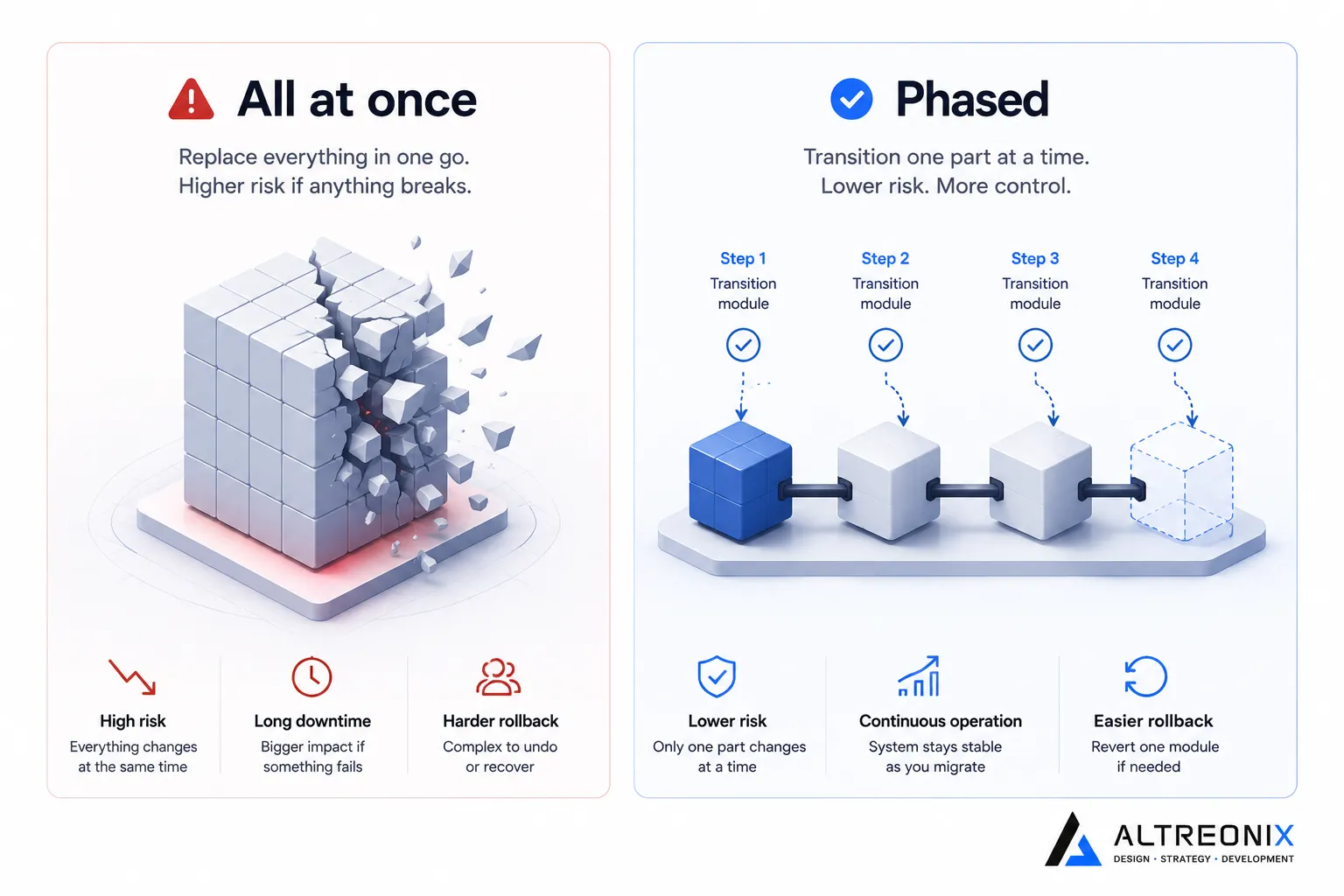
Most failed migrations don’t fail because leaving a no-code platform was the wrong decision. They fail because the move was treated as a single, all-or-nothing event instead of a controlled, incremental process.
Why “Rebuild and Hope” Fails
It’s worth looking outside the no-code world for a moment, because the failure pattern is identical at every scale. In 2018, a UK bank attempted to migrate 5.2 million customer accounts to a new core banking platform in a single weekend cutover. It went badly enough that 1.9 million customers were locked out of their accounts, the resulting fraud exposure and remediation cost the bank roughly 330 million pounds, regulators issued a further 48.65 million pound fine, and the CEO resigned within the year. A separate, unrelated incident in 2012 saw a trading firm lose 440 million dollars in 45 minutes when a single deployment accidentally reactivated a piece of dormant legacy code that had been sitting untouched on one server for nearly a decade.
Neither of these companies failed because modernizing their systems was a bad idea. They failed because they tried to replace a deeply embedded system in one irreversible move, with no way to isolate risk, test incrementally, or roll back if something went wrong.
A no-code migration is smaller in scale, but the same structural risk is present. Move everything at once, discover a broken workflow or a missing edge case after cutover, and you’re debugging a live business with no fallback, instead of catching the problem in a controlled test.
Treat Your No-Code App as a Validated Blueprint, Not Throwaway Work
Here’s the advantage a no-code migration has that a from-scratch software project doesn’t: your existing app already tells you exactly what your business needs, because it’s been running in production and absorbing real edge cases for months or years. Every workaround your team built, every weird data entry your users have made, every integration that turned out to matter more than expected, all of that is a specification you already have, for free.
 Treating the existing Bubble, Airtable, or Webflow app as a blueprint to faithfully translate, rather than a rough draft to improve on the fly during the rebuild, removes an enormous amount of risk. The goal of the first migration pass isn’t to build something better, it’s to build something equivalent, on infrastructure you actually control. Improvements can come afterward, once the equivalent system is live and stable.
The Strangler Fig Approach: Migrate in Slices, Not One Leap
There’s a well-established pattern in software engineering for exactly this situation, called the Strangler Fig pattern, named after the way certain fig species gradually grow around a host tree until the original is no longer structurally needed. Applied to a migration, it means putting a routing layer in front of both the old and new systems, so that traffic and functionality shift over gradually, feature by feature, while the old platform keeps running underneath the whole time.
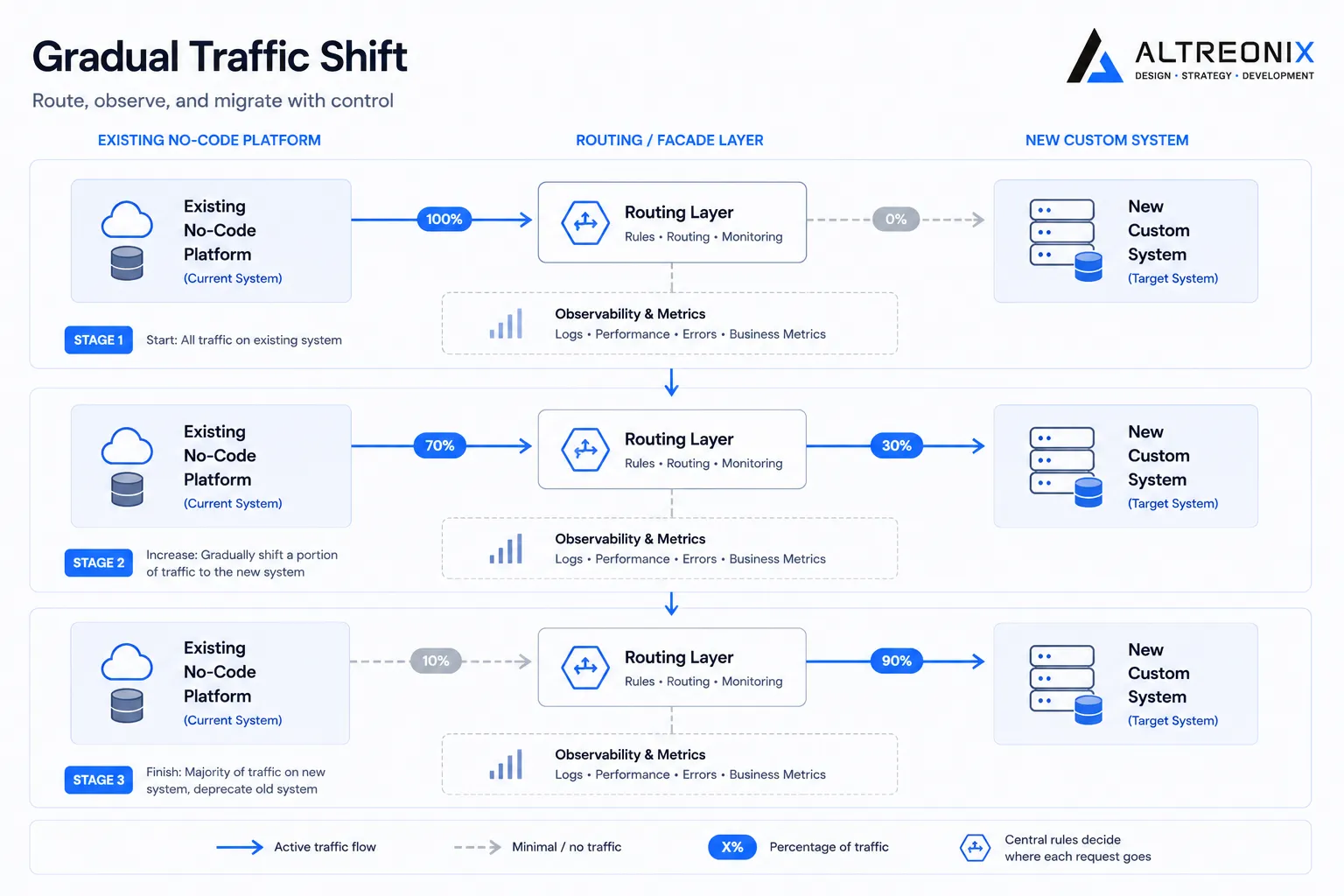 In practice, for a no-code migration, this looks like standing up the new custom system alongside the existing Bubble, Airtable, or Webflow app, rather than after decommissioning it. You pick one self-contained piece of functionality, ideally something high-value but reasonably isolated from the rest of the app, and rebuild just that piece first. Real users start using the new version of that one feature while everything else continues running on the old platform exactly as before. Once that slice is confirmed stable, you move to the next one.
This approach has a specific advantage over a full rebuild-then-switch model: if something goes wrong with the new slice, you roll back to the old platform’s version of that one feature, not the entire application. The blast radius of any single mistake stays small and contained, instead of taking down your whole business at once.
A Practical Step-by-Step Migration Plan
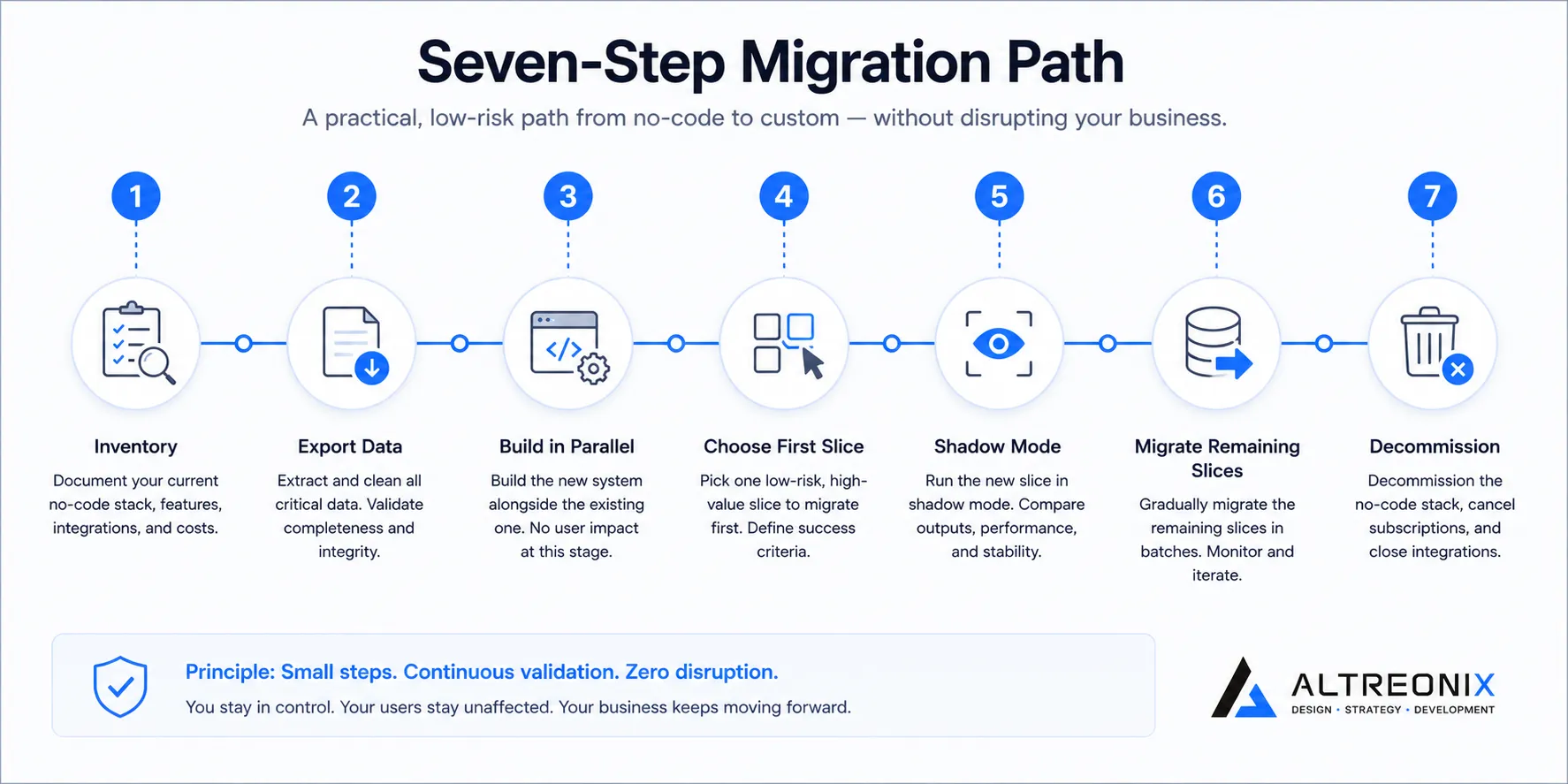
1. Inventory everything before writing a line of new code. Map every workflow, every data table, every third-party integration currently running in your no-code app. This discovery phase is where most migration timelines actually go wrong, not because the engineering is hard, but because something important gets missed early and surfaces as a surprise midway through the build.
2. Export and preserve your data immediately, even before you’re ready to migrate. This matters more for some platforms than others. Bubble, for example, allows data export but not export of the underlying application logic, so your data is the one asset you can and should secure independently of the rebuild timeline. Don’t wait until the migration is scoped to pull a full backup.
3. Build the new system in parallel with the old one running, never after shutting it down. The old platform is your safety net for the entire duration of the migration. It only gets decommissioned once every piece of functionality has been confirmed working on the new system, not before.
4. Choose your first slice deliberately. Look for functionality that’s genuinely high-value to your business but reasonably self-contained, meaning it doesn’t have deep, tangled dependencies on five other parts of the app. A feature that’s both important and isolated gives you a meaningful early win with contained risk.
5. Run the new slice in shadow mode before full cutover, if your architecture allows it. This means the new system processes real requests alongside the old one, without yet being the system of record, so you can compare outputs and catch discrepancies before anyone’s real data depends on the new version.
6. Migrate remaining slices incrementally, validating each one before moving to the next. Resist the temptation to speed up by batching several features into one cutover once the first one goes well. The value of this approach is precisely that each slice is small enough to fully verify.
7. Decommission the old platform only after a full parallel-run period with no discrepancies. This is the step most commonly rushed, understandably, since it’s tempting to stop paying for two systems as soon as the new one seems to work. Give it real time under real load before pulling the safety net away entirely.
 ## What Actually Goes Wrong in No-Code Migrations Specifically
The general failure pattern above shows up in predictable, no-code-specific ways. Meerako’s documented migration from Bubble to a custom Next.js, Node.js, and PostgreSQL stack succeeded in part because the team treated the existing Bubble app’s data model and workflows as the specification for the new build, rather than redesigning from scratch mid-migration. Idealogic’s account of leaving Webflow and AISurvivors’ migration from Webflow to Next.js both describe the same underlying discipline, treating the visual builder’s existing structure as the blueprint to replicate in code first, with improvements layered on afterward rather than attempted simultaneously.
The most common no-code-specific mistake is underestimating integration sprawl. A stack held together by fifteen or more Zapier or Make automations, the kind we covered in our technical deep dive, often has business logic living inside those automations that nobody documented anywhere else. Skipping the inventory step specifically because “we already know our stack” is where this kind of hidden logic gets missed, and it’s almost always discovered the hard way, after cutover, rather than during discovery.
A Realistic Timeline
Based on the migration case studies we reviewed for this cluster, a straightforward single-platform migration typically runs eight to twelve weeks, while a more complex multi-tool stack migration can extend to twelve to sixteen weeks or longer. We cover the full cost breakdown behind these timelines in our cost comparison post. The point worth emphasizing here is that a phased, slice-by-slice timeline isn’t slower than a big-bang rebuild in any way that matters, the total engineering time is comparable either way. What changes is when problems get discovered, early and contained, instead of all at once, in production, after the old system is already gone.
How We Think About This at Altreonix
Every migration we run starts with the inventory step, mapping the existing no-code app’s workflows and data model in full, before any new code gets written. We build the new system in parallel with the old one running, and we treat the existing app as a working specification to replicate faithfully first and improve deliberately afterward. Our Web Applications and Business Systems work is structured around exactly this discipline, because the businesses we’ve seen have the roughest migrations are the ones that skipped it.
If you’re planning a migration and want a second opinion on the sequencing, that’s a reasonable place to start a conversation with us.