The Question We Get Right After “Should We Build Custom”
Once a founder or ops lead agrees that off-the-shelf is holding their workflow back, the very next question is always the same: how much is this actually going to cost.
It’s a fair question, and it’s also one that generic pricing pages can’t answer honestly, because the answer depends entirely on scope. A single-team lead tracker and a multi-department system tied into ERP and production data are both “custom CRMs,” and they can be ten times apart in price.
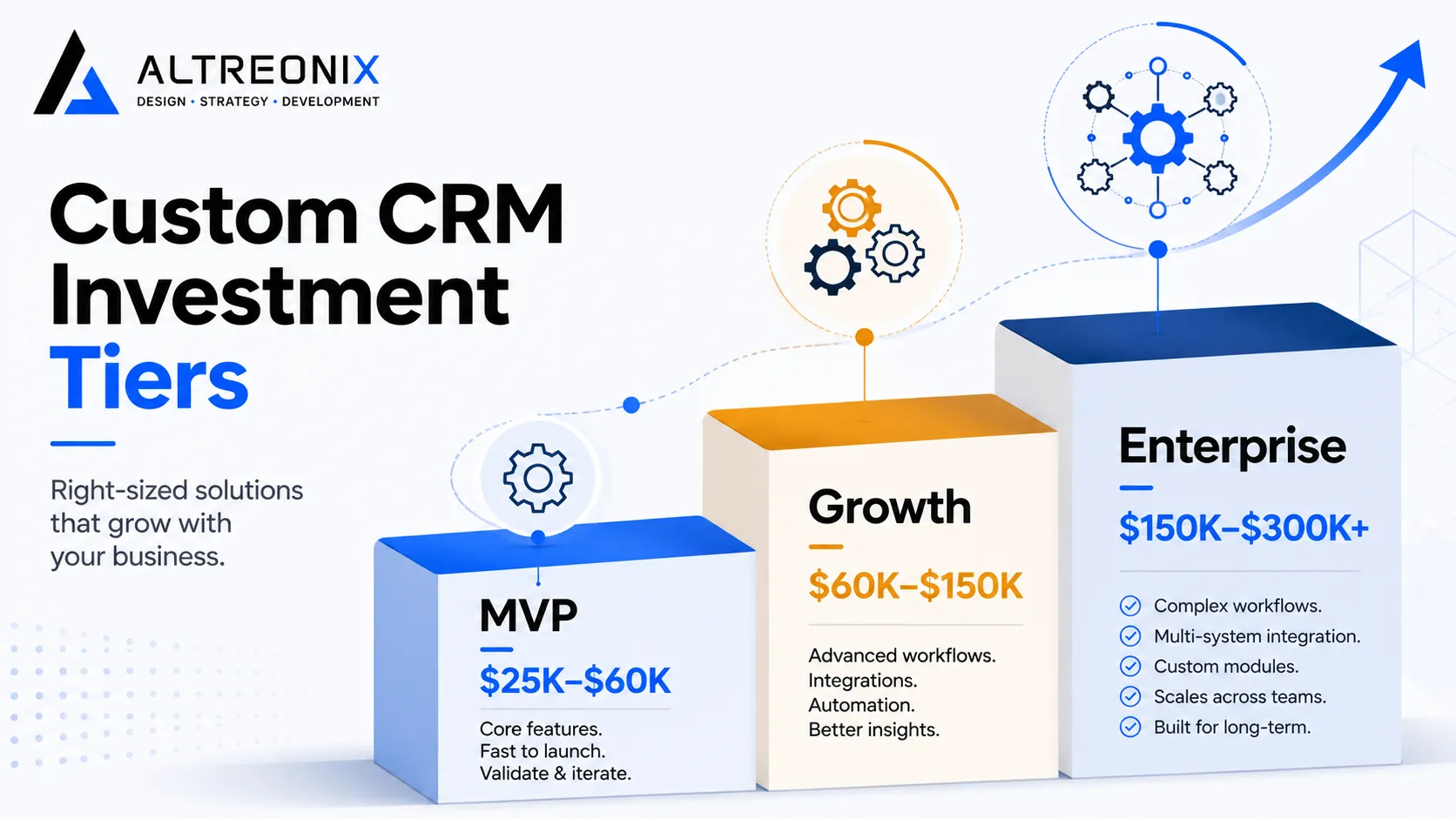
In our pillar guide on custom versus off-the-shelf CRM, we gave a broad 2026 cost range: roughly $25,000 for a focused MVP up to $300,000+ for an enterprise-grade build. This post exists to break that range apart, so you can see exactly what moves the number and where your project is likely to land before you ever get on a call with a development studio.
The Real Cost Range in 2026
Custom CRM pricing tends to cluster into three practical tiers. None of these are fixed prices, they’re bands based on the projects we see and current 2026 custom CRM cost benchmarking.
| Tier | Typical Cost Range | Timeline | Best Fit |
|---|---|---|---|
| MVP / Focused Build | $25,000 to $60,000 | 6 to 10 weeks | Single team, one core workflow, minimal integrations |
| Growth / Mid-Scope | $60,000 to $150,000 | 3 to 5 months | Multiple departments, several integrations, custom reporting |
| Enterprise / Full-Featured | $150,000 to $300,000+ | 5 to 9+ months | Multi-location, deep ERP/production integration, AI-driven automation, compliance requirements |
The jump between tiers isn’t arbitrary. It almost always comes down to three things: how many systems you’re integrating with, how much of your workflow is genuinely non-standard versus adaptable, and how much automation or AI logic sits on top of the core CRM. We’ll walk through each of those next.
What Actually Drives Custom CRM Cost
A custom CRM quote is really a sum of several distinct pieces of work, each with its own cost driver. Understanding these line items is the fastest way to sanity-check a proposal, whether it’s ours or someone else’s.
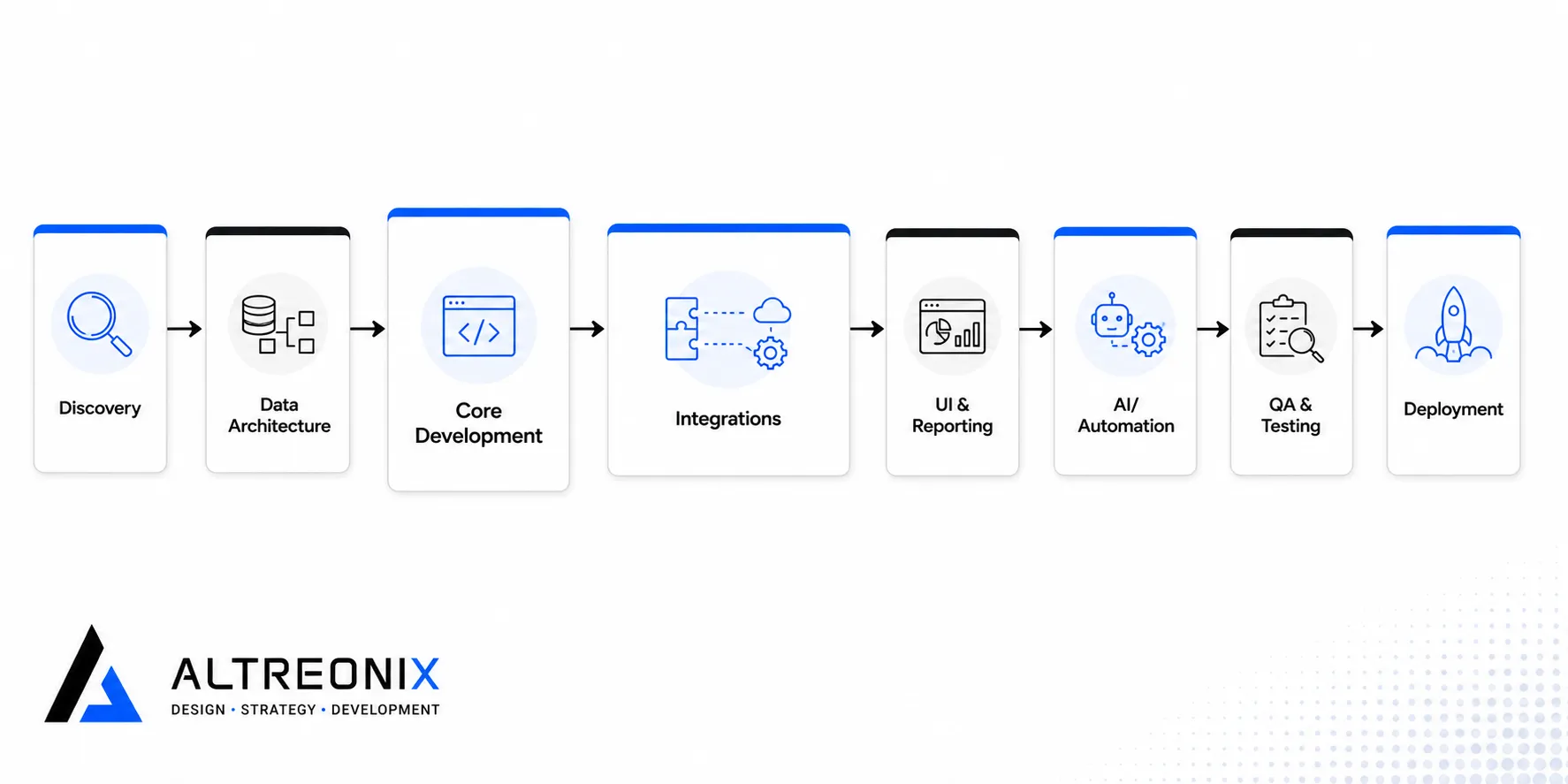 - Discovery and workflow mapping. Documenting your actual pipeline, data flows, and edge cases before anything gets built. Skipping or rushing this step is the single biggest cause of budget overruns later.
- Data architecture and migration. Designing the data model and moving existing records over from spreadsheets or a legacy CRM without breaking historical reporting.
- Core module development. The pipeline, contact records, and workflow logic that make up the heart of the system.
- Integrations. Connections to ERP, accounting, email, calendar, or industry-specific tools. Each additional integration adds real cost, especially when the third-party system has a limited or poorly documented API.
- UI and reporting. Custom dashboards and views built around how your team actually reads data, not a generic template.
- AI and automation layer. Lead scoring, forecasting, or workflow automation built around your specific data, rather than a vendor’s generic model.
- QA and testing. Verifying the system holds up under real data volume and real edge cases, not just the happy path.
- Deployment and training. Getting the system live and getting your team using it, which matters more than people expect.
- Ongoing maintenance. Bug fixes, small feature requests, and platform updates after launch.
As a rough rule, discovery, data architecture, and core development make up the bulk of an MVP budget, while integrations and the AI/automation layer are what push a project from mid-scope into enterprise territory. This matches what independent build-cost breakdowns from Switchplane’s analysis of custom CRM economics and other cost guides consistently show: integration complexity, not raw feature count, is usually the real cost multiplier.
MVP vs Full-Featured: What You’re Actually Choosing Between
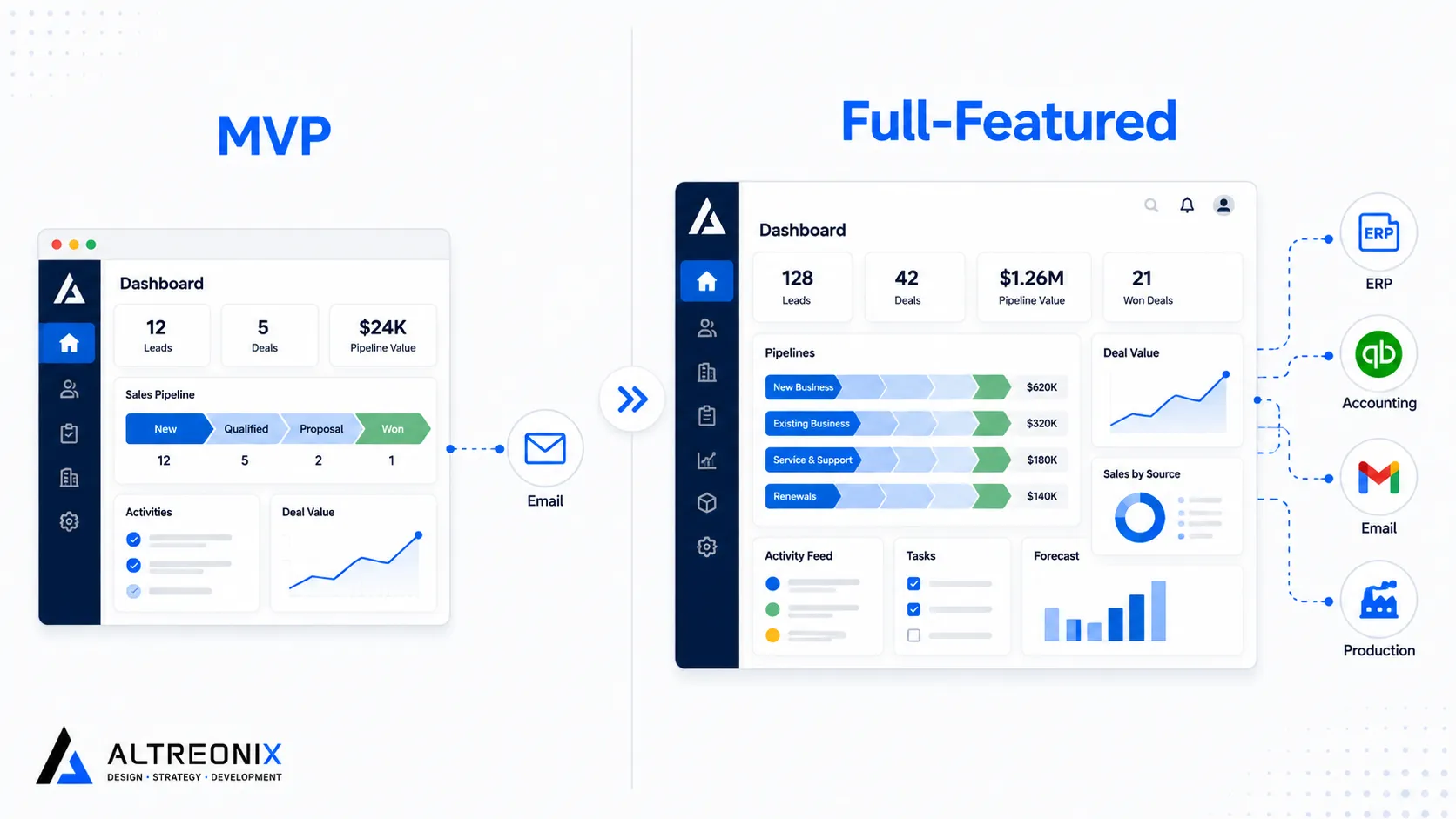
“MVP” gets used loosely in software conversations, so it’s worth being specific about what separates a focused build from a full-featured one.
 | Scope Element | MVP Build | Full-Featured Build |
| --- | --- | --- |
| Core pipeline | Single, workflow-specific pipeline | Multiple pipelines across departments |
| Integrations | 1 to 2 critical systems (e.g. email, one ERP module) | Full ERP, accounting, production, and communication stack |
| Reporting | Standard dashboards | Custom, role-based reporting and forecasting |
| Automation | Basic status-based triggers | AI-driven scoring, forecasting, and workflow automation |
| Data migration | Core records only | Full historical dataset with validation |
| Users | Typically under 20 | 20 to 250+ |
| Compliance | Standard security practices | Industry-specific compliance (e.g. data residency, audit trails) |
| Scope Element | MVP Build | Full-Featured Build |
| --- | --- | --- |
| Core pipeline | Single, workflow-specific pipeline | Multiple pipelines across departments |
| Integrations | 1 to 2 critical systems (e.g. email, one ERP module) | Full ERP, accounting, production, and communication stack |
| Reporting | Standard dashboards | Custom, role-based reporting and forecasting |
| Automation | Basic status-based triggers | AI-driven scoring, forecasting, and workflow automation |
| Data migration | Core records only | Full historical dataset with validation |
| Users | Typically under 20 | 20 to 250+ |
| Compliance | Standard security practices | Industry-specific compliance (e.g. data residency, audit trails) |
The MVP path isn’t a lesser version of the “real” product, it’s a deliberate way to validate that custom development actually solves your workflow problem before committing to the full build. We covered this staged logic in more depth in the hybrid approach section of the pillar guide, and it applies just as much to a first custom build as it does to layering custom modules onto an existing CRM.
How This Compares to 5 Years of Off-the-Shelf Pricing
The number that changes people’s minds is rarely the build cost on its own, it’s the build cost next to five years of subscription pricing.
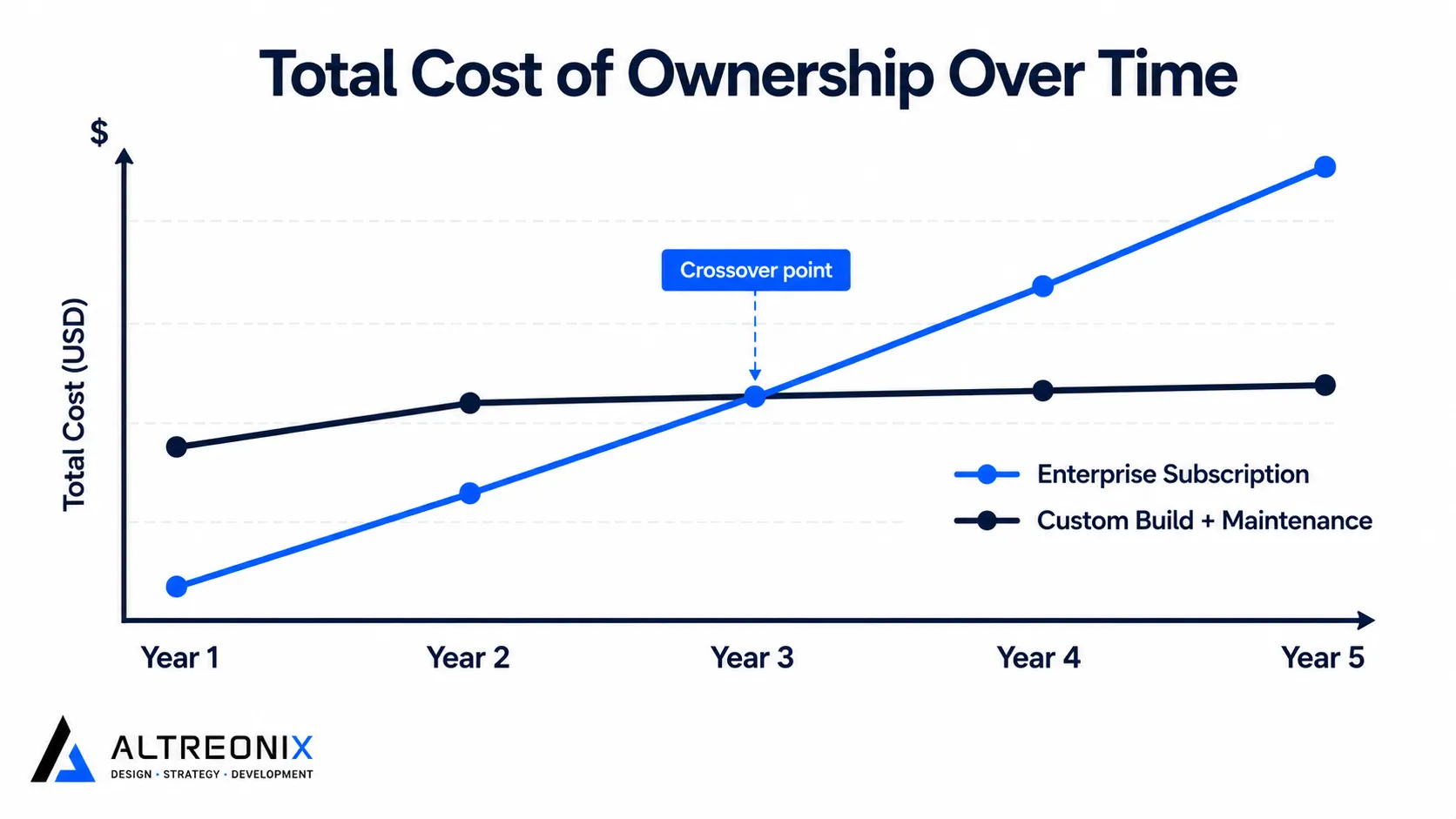 Switchplane’s cost comparison research found that a 25-user team on enterprise-tier CRM licensing can accumulate close to £180,000 in subscription costs over five years, before counting add-ons, premium support tiers, or per-seat increases as the team grows. A mid-scope custom build in the $60,000 to $150,000 range, plus modest annual maintenance, frequently lands below that total by year three or four, while giving you a system that fits your workflow instead of one you’re still configuring around.
This isn’t an argument that custom always wins on cost. Below roughly 15 to 20 users, subscription pricing usually stays cheaper for longer. It’s a reminder to run the five-year number, not just the sticker price, before assuming either option is the “affordable” one. Our full build-vs-buy cost and risk comparison walks through that full comparison, including where the crossover point tends to sit for different team sizes.
How We Price Fixed-Scope Custom CRM Projects
We scope every custom CRM engagement as fixed-price and fixed-scope, not open-ended hourly work. That decision comes directly from where we see budgets actually blow out: vague requirements and scope creep discovered mid-build, not the initial estimate being wrong.
In practice, that means:
- A paid discovery phase that maps your actual workflow, data, and integration needs before we quote the build.
- A fixed quote tied to that documented scope, so the number you agree to is the number you pay.
- Clear boundaries on what’s included, with any new requests scoped and priced separately rather than silently absorbed into the timeline.
This is also why we can’t give an honest number without knowing your specifics. A pipeline with one integration and a pipeline with five ERP touchpoints are not the same project, even if they both start from a similar-looking CRM.
A Quick Framework to Estimate Your Own Budget Range
Before any conversation with a development partner, you can narrow your own range with four questions:
- How many core workflows need to live in the system? One workflow points toward MVP pricing. Three or more departmental workflows point toward mid-scope or higher.
- How many systems does it need to talk to? Each additional integration, especially with ERP or production systems, pushes the estimate up a tier.
- Do you need AI-driven automation, or rule-based automation? Simple status triggers are inexpensive. Predictive scoring or forecasting built on your own data adds meaningful cost and time.
- How much historical data needs to migrate cleanly? A few hundred contact records is trivial. Years of transaction history with reporting dependencies is not.
If most of your answers point to “one,” you’re likely looking at an MVP-tier project. If you’re answering “several” across the board, budget for mid-scope or above from the start rather than being surprised later.
Conclusion
There’s no single honest answer to “how much does a custom CRM cost,” but there is an honest range, and more importantly, a set of specific factors that move you within it. Integrations and automation complexity matter more than raw feature count. Discovery quality matters more than development speed. And the real comparison isn’t your build cost against zero, it’s your build cost against five years of the subscription pricing you’re already paying or about to sign up for.
If you have a rough sense of your workflows, integrations, and team size, we can usually give you a realistic budget band before a full discovery engagement. Our internal software and business systems team can walk through where your project is likely to land and why.