
When Spreadsheets Become Your Operations System of Record
Somewhere between your first ten employees and your fiftieth, a shift happens that almost nobody notices in the moment. A spreadsheet that started as a simple tracker becomes the actual system your business runs on. Inventory counts live in it. Approvals happen through comments in it. New hires get onboarded from a folder next to it. Nobody decided this on purpose. It just accumulated, one workaround at a time, until the spreadsheet was doing the job of a real operations system without any of the structure a real system provides.
We want to be specific about what “outgrown” means here, because it’s not about the size of the file. It’s about four things happening at once: edit conflicts between people working on the same data, version proliferation where nobody’s sure which copy is current, dependency on one person who understands how the file actually works, and no real audit trail of who changed what and when. Any one of these is manageable. All four together mean your operations are running on infrastructure that was never built to run a business.
This guide is for the businesses we hear from most often, teams of 10 to 50 people who might already have a CRM for sales, but whose actual operations, inventory, approvals, onboarding, internal task tracking, still run on spreadsheets, email, and whatever process lives in someone’s head. If that’s you, this is the roadmap for moving from spreadsheet chaos to systems that actually fit how you work, without pretending a CRM or a generic SaaS subscription will fix a problem it was never built to solve.
The Hidden Cost of Manual Operations for 10 to 50-Person Teams
The reason this problem persists so long is that it’s invisible on paper. There’s no invoice for hours spent re-entering the same order into three tools, or for the afternoon someone loses reconciling two versions of a file that should have been one. A recent analysis of SME financial management practices found that 80% of small and mid-sized businesses still run core financial workflows manually, with over a third reporting data entry errors and payment delays tied directly to manual approval chains. That’s not a minority problem. That’s the default state for most growing businesses, regardless of whether they’ve already adopted a CRM for sales.
Labor cost is the most direct piece of this. Once you account for order entry, status chasing, and re-typing the same data across disconnected tools, industry estimates on manual workflow overhead put the fully loaded cost in the tens of thousands of dollars per employee per year. For a 10-person operations team, that adds up to a real number fast, and it doesn’t shrink proportionally with headcount, because the coordination overhead comes from the process, not the number of people running it.
We’ve written a full breakdown of exactly how to calculate this cost for your own team, including a formula you can run with your own hours and labor rates. The short version: most teams underestimate this number by a wide margin, because the cost is distributed across dozens of small moments rather than concentrated somewhere obvious.
Five Operational Signs You’ve Outgrown Spreadsheets
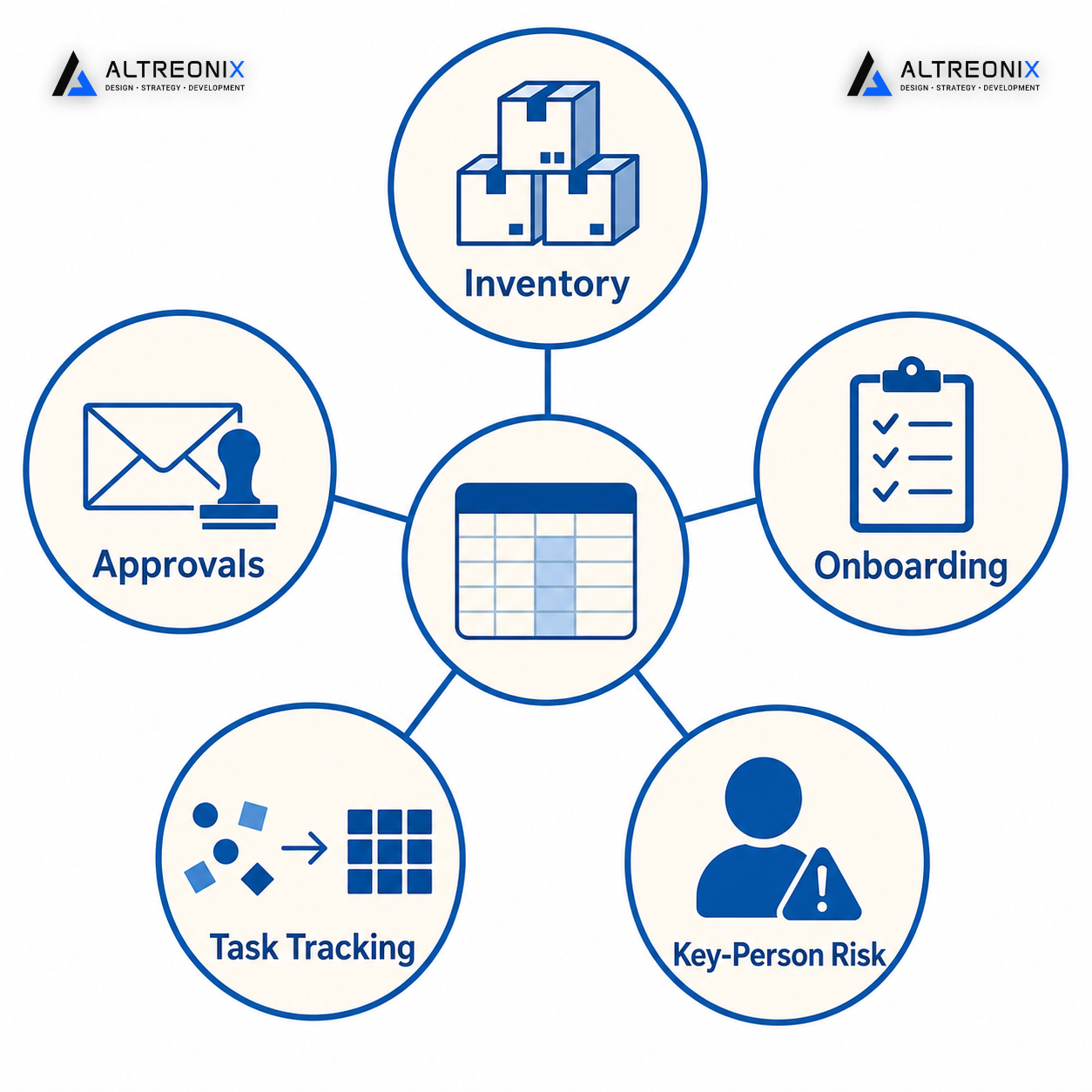
Beyond sales and CRM, here’s where we consistently see spreadsheet-driven operations start to break down.
Inventory inaccuracies. Stock counts drift from reality the moment more than one person is updating the same sheet. Spreadsheets fail predictably at inventory management once volume and SKU count pass a certain point, leading to stock-outs on items you thought you had and overstocks on items nobody’s tracking properly.
Approvals lost in email threads. Budget sign-offs, vendor approvals, and HR requests that live in inboxes have no visible status and no audit trail. At the 10 to 50-employee mark, approval bottlenecks in email and chat tools become a measurable drag on operations rather than an occasional annoyance.
Onboarding and SOPs trapped in shared folders. New hires learn the process from whoever trained them last, not from a documented system. This is one of the most under-covered operational gaps for growing businesses, and it’s usually the first thing to break when someone experienced leaves.
Internal task tracking scattered across disconnected sheets. Projects and operational tasks tracked in separate files with no shared visibility mean managers are reconstructing status by asking around rather than looking at a dashboard.
Key-person dependency and spreadsheet breakage. Formula errors, performance issues, and one irreplaceable file owner are the clearest sign the tool has outgrown its purpose. If you want the full diagnostic checklist across all seven of these symptoms, we cover each one in detail here, including what to actually replace each pattern with.
What “Business Systems Beyond CRM” Actually Includes
This is the part most content skips, because most content about “outgrowing spreadsheets” jumps straight to recommending a CRM or a specific no-code platform. A CRM manages your sales pipeline and customer relationships. It was never designed to run your inventory, your approvals, or your onboarding process, and businesses that already have a CRM still describe it as “just for sales” while their actual operations remain untouched by it. We’ve also written separately about why CRM implementations fail even when the tool itself is the right one, which is worth understanding before assuming a CRM purchase will solve an operations problem.
“Business systems beyond CRM” covers a distinct set of system types, each solving a different operational gap:
Inventory and order management systems track stock levels, orders, and fulfillment in real time, with validation rules that catch a mis-entered quantity before it becomes a shipping mistake rather than after a customer notices. Without one, the same SKU count often exists in three slightly different versions by the end of the week.
Approval workflow systems route budget, HR, and vendor decisions through defined steps, with a visible status and a permanent record of who approved what and when. This is the piece most businesses underestimate, because an email approval feels fast in the moment even though it leaves no trace once the thread gets buried.
Onboarding and SOP systems turn tribal knowledge into a documented, repeatable process anyone on the team can follow correctly, rather than whatever the last person who trained them happened to remember. This is usually the first system to fail visibly the moment an experienced employee leaves.
Internal task and project tracking systems are built for operations teams specifically, not repurposed from a generic project management tool designed around software sprints. Operations work is rarely a clean backlog of tickets, and forcing it into that shape tends to create more status-chasing, not less.
Automation glue, using tools like n8n alongside AI where it earns its place, connects the systems above without forcing a wholesale platform migration. This is often the fastest win of the five, since it doesn’t require replacing anything you already use.
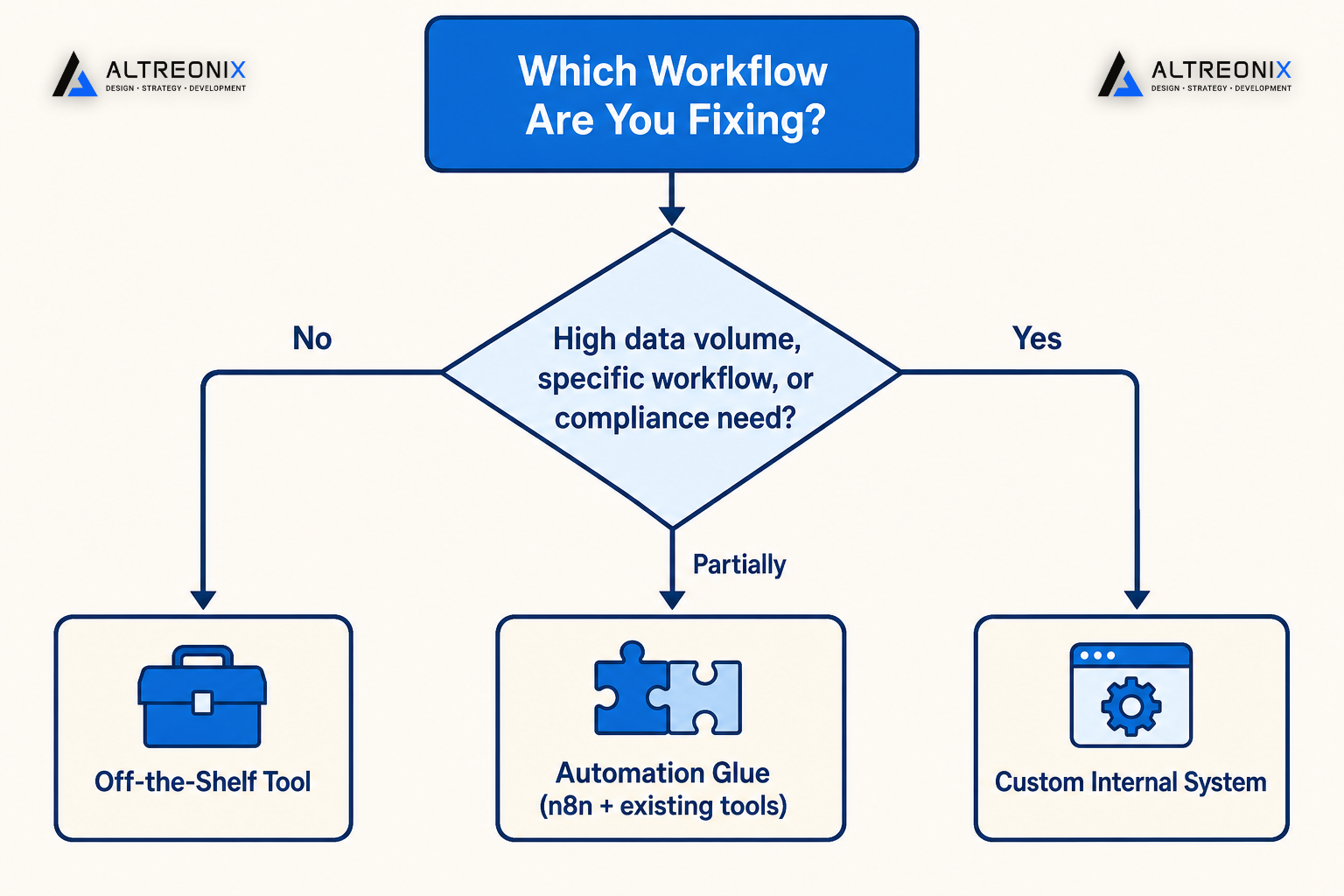
Each of these can be addressed with an off-the-shelf tool, a semi-custom configuration, or a fully custom internal system, and the right answer depends entirely on how standard or specific your actual workflow is.
Mapping Your Current Spreadsheets to the Right Systems
Before picking a solution, it helps to categorize what your spreadsheets are actually doing. Most operations teams are running several distinct “systems” inside what looks like one messy folder of files, and the mistake we see most often is treating all of it as one undifferentiated “spreadsheet problem” that needs one big solution. It rarely does. An inventory sheet and an onboarding checklist have almost nothing in common structurally, and bundling them into a single software search is how these projects end up stalled or overbuilt.
| What Your Spreadsheet Is Doing | What It’s Actually Trying to Be | Best-Fit System Type |
|---|---|---|
| Tracking stock levels, reorder points, SKU counts | An inventory management system | Off-the-shelf inventory tool or custom system, depending on SKU complexity |
| Routing budget or vendor sign-offs through comments or color codes | An approval workflow system | Dedicated approval tool or lightweight custom workflow |
| Storing new-hire checklists and process notes | An onboarding and SOP system | Documented internal system with role-based checklists |
| Listing tasks, owners, and due dates across departments | An internal project tracking system | Operations-specific task system, not a generic PM tool |
| Calculating costs, margins, or reconciling numbers between tools | A finance and reporting layer | Automation glue connecting existing finance tools |
Once you know which category a given spreadsheet actually falls into, the question stops being “should we buy software” and becomes “which type of system fits this specific workflow,” which is a much easier decision to make well. It also tends to surface that a business doesn’t need five separate initiatives. Most teams find that two or three of their spreadsheets map to the same underlying system type, which means fixing one workflow properly often solves what looked like three separate problems.
Quantifying the ROI: How Much Manual Operations Are Really Costing You
The formula for this is straightforward, even if most teams never run it: weekly hours spent on manual tasks, multiplied by hourly labor cost and 52 weeks, plus your error rate multiplied by transaction volume and average cost per error. We walk through a full worked example with real numbers across different team sizes in our cost breakdown post, but the pattern holds across almost every business we’ve worked with: the number is larger than expected, and it grows faster with volume than with headcount.
What matters more than the exact figure is the payback comparison. Analyses of automation ROI across small businesses consistently show a 3 to 6 month payback period and 40 to 70% time savings once the highest-friction workflow is properly systemized. That’s a meaningfully different conversation than “can we afford to fix this,” and closer to “can we afford not to.”
Upgrade Paths: Starting With the One Workflow That Hurts Most
The instinct to replace everything at once is understandable and almost always the wrong move. A staged approach consistently outperforms a full migration, for a simple reason: it lets you catch what the plan missed before it’s running your whole business.
- Assessment. Identify which single workflow, inventory, approvals, or onboarding, is causing the most combined labor and error cost using the formula above. This step alone usually takes less than a week and often surfaces a clear front-runner that everyone on the team already suspected but never quantified.
- Pilot. Build or configure the replacement for that one workflow only, and run it alongside the existing spreadsheet rather than cutting over immediately. The point of the pilot isn’t to prove the new system works in theory, it’s to catch the edge cases and exceptions that never make it into a clean requirements list until real data starts flowing through.
- Scale and integrate. Once the pilot proves out, retire the spreadsheet for that workflow, document the new system for the team, and move to the next highest-cost workflow. The lessons from the first pilot, what the requirements missed, how long adoption actually took, make every subsequent workflow faster to fix.
Crisis migrations, where a business is forced to replace a system after it fails, consistently cost more and carry more risk than a planned, staged rollout. Running the new system in parallel for a period before cutting over is the difference between a smooth transition and a scramble.
Lightweight Automation: Using n8n and AI to Glue Your Systems Together
You don’t need to replace every tool you use to capture a meaningful share of the savings above. This is where automation earns its place, not by replacing your systems, but by connecting the ones you already have. A tool like n8n can move data between your inventory sheet, your accounting software, and your approval process without requiring a full platform migration, which matters enormously for teams not ready for that scale of change.
The distinction that matters here is between simple automation and AI agents, and they solve different problems. Workflow automation, RPA, and AI agents get used interchangeably in most content, but they behave very differently in practice, and picking the wrong one for a given workflow is a common and avoidable mistake. For most of the operational workflows covered in this guide, inventory syncing, approval routing, onboarding checklists, structured automation handles the job reliably. AI earns its place specifically where a task involves judgment or unstructured input a rigid workflow can’t handle, not as a default choice for every process.
We lean toward custom automation over autonomous AI agents for most operational use cases like these, specifically because a well-defined workflow behaves predictably, while an agent introduces variables that are hard to fully control even with careful prompting. That’s not a blanket rule against AI, it’s a reason to reach for automation first and layer in AI only where the task genuinely requires it.
In practice, this looks fairly unglamorous. A vendor approval request submitted through a simple form triggers a workflow that checks the amount against a threshold, routes it to the right approver automatically, logs the decision with a timestamp, and updates the inventory or finance sheet it affects, all without anyone touching a spreadsheet manually. None of that requires an AI agent making judgment calls. It requires a workflow that reliably does the same thing every time, which is exactly what most operational bottlenecks actually need.
Build vs Buy: When You Need Custom Internal Systems
Not every workflow above needs custom software, and assuming otherwise is how operations projects end up overbuilt and overbudget. Off-the-shelf tools handle standard processes well. Custom internal systems earn their cost when one or more of these triggers show up:
- Data volume or complexity that generic tools struggle to handle without heavy workarounds, particularly around inventory with high SKU counts or complex reorder logic.
- Workflow specificity where your actual approval chain, onboarding process, or inventory logic doesn’t map cleanly onto how an off-the-shelf tool expects the process to work.
- Integration complexity across multiple existing tools that a single SaaS product can’t cleanly connect.
- Compliance or audit requirements where you need a permanent, structured record of who did what and when, beyond what a generic tool logs by default.
If none of these apply strongly, an off-the-shelf or semi-custom configuration is usually the faster, cheaper path, and we’d tell you that directly rather than push a custom build you don’t need. If they do apply, a custom internal system built around your actual workflow tends to pay for itself faster than forcing your process to bend around a generic tool’s assumptions.
Why the Common Objections Don’t Hold Up
Three objections come up in almost every conversation we have about this, and each one is worth addressing directly rather than glossing over.
“Our spreadsheet works fine, we don’t have time to change it.” This is usually true right up until it isn’t. Diagnostic frameworks for spreadsheet-dependent operations consistently flag that the businesses waiting for a crisis to force the decision end up migrating under pressure, which is a materially worse experience than a planned, staged rollout done on your own timeline.
“Systems and automation are too expensive for a business our size.” This assumption usually comes from pricing out a full platform replacement rather than a single-workflow fix. Automation isn’t the optional, enterprise-only investment it’s sometimes framed as; for a well-scoped single workflow, the payback period is typically measured in months, not years.
“We’re not technical enough for this.” Most of the operations teams we’ve built systems for aren’t software teams, and that’s the point. A properly scoped system should require less technical fluency to operate correctly than the spreadsheet it replaces, not more. The barrier here is usually assumption, not actual capability.
Next Steps: Running a 30-Day Operations Systems Audit
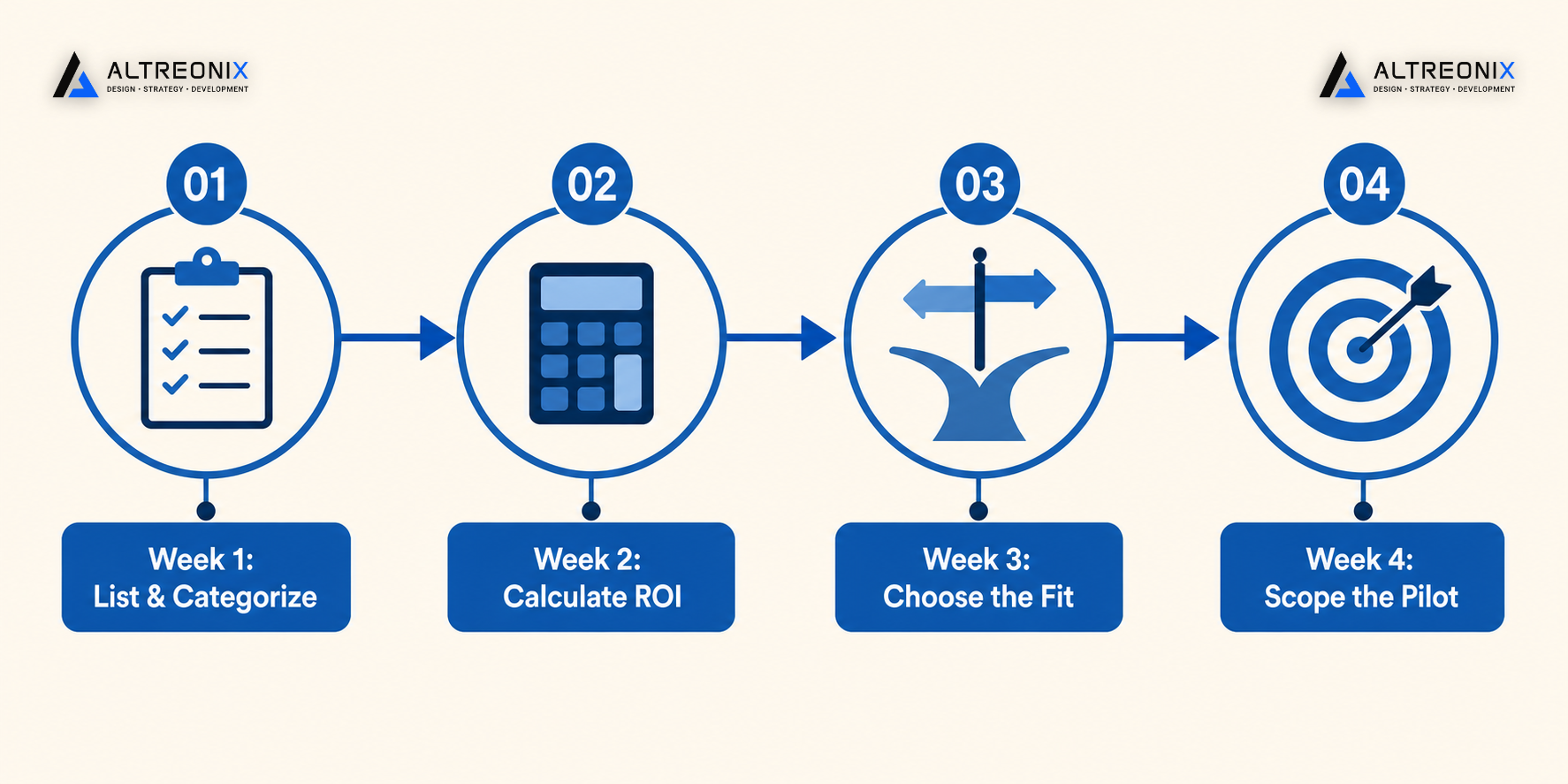
You don’t need a six-month strategy exercise to get moving. A focused 30-day audit is usually enough to identify the one workflow worth fixing first:
- Week 1: List every spreadsheet currently functioning as a system of record, and categorize each one using the mapping table above.
- Week 2: Run the ROI formula against your highest-suspicion workflow to get a real cost number, not a guess.
- Week 3: Decide, for that one workflow, whether an off-the-shelf tool, a lightweight automation, or a custom system is the right fit, using the build vs buy triggers above.
- Week 4: Scope a pilot for that single workflow, with a plan to run it in parallel before any cutover.
If any part of this looks like your current operations, the next step is usually a structured look at what your spreadsheets are actually doing versus what they should be doing. We offer an Operations Systems Audit, a focused session where we map your current spreadsheets and manual workflows to a clear systems blueprint, inventory, approvals, onboarding, and automation, and tell you honestly which one is worth fixing first. Book a conversation with us and bring whatever spreadsheet is currently running more of your business than it should be.