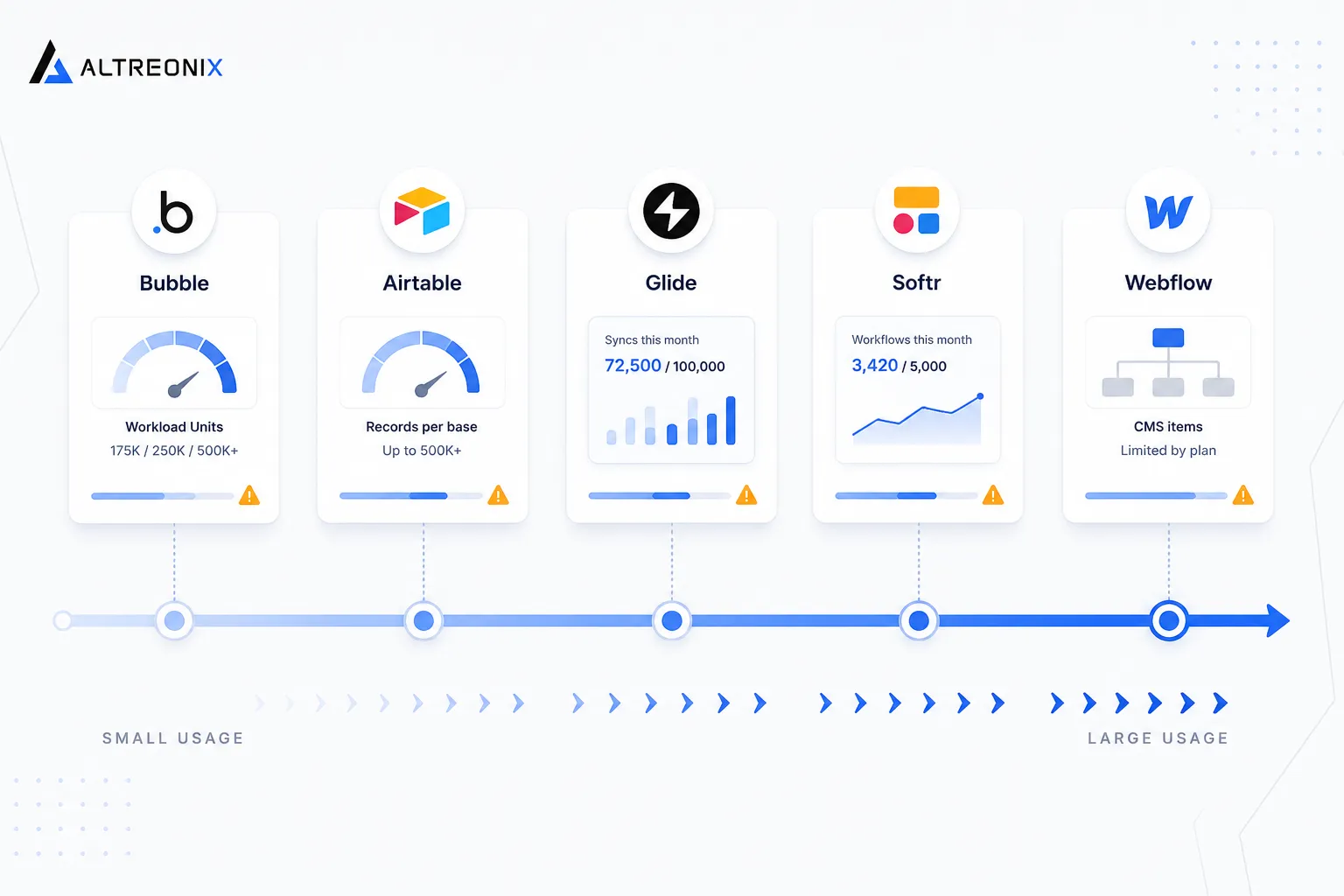
Our pillar post and diagnostic checklist covered the business case for knowing when a no-code platform has become a liability. This post goes one level deeper. We wanted to understand, mechanically, what actually breaks inside Bubble, Airtable, Glide, Softr, and Webflow as usage grows, not just “it gets slow” or “it gets expensive,” but the specific technical reason each one does.
We started from the research we’d already gathered for this cluster, then went back and checked every number against each platform’s own current documentation, developer forums, and official incident reports rather than relying on secondhand summaries. Pricing pages change often enough that a number from a few months ago can already be wrong, so where we cite a specific figure below, we pulled it directly from the source, not from memory or a single blog post repeating another blog post.
You don’t need to be technical to follow this. Each section explains the mechanism in plain terms first, with the underlying detail available for anyone who wants it.
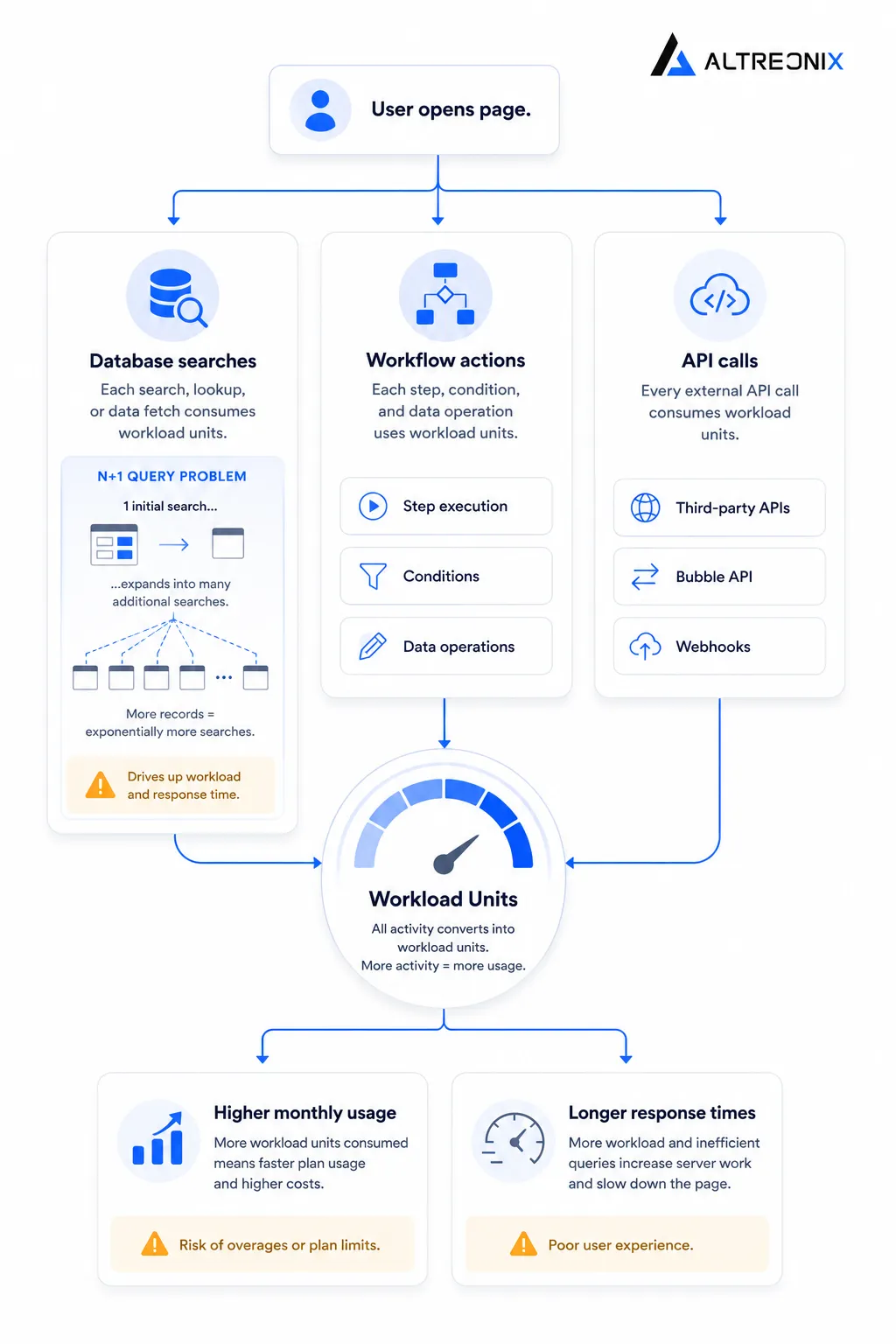
Bubble: The Workload Unit Engine and Why Performance Degrades
Bubble prices its paid plans using something called Workload Units, a metering system that counts server-side computational work. Every database query, every workflow step, every API call consumes units, and each plan includes a monthly allocation: 175,000 on Starter, 250,000 on Growth, and 500,000 on Team, with overage billed once you exceed it.
That pricing model exists because of how Bubble’s underlying engine works, and understanding the mechanism explains why apps slow down as they grow, not just why bills go up.
The N+1 query problem. Bubble’s own documentation gives a clear example of this. If a page shows a list of 1,000 items, and each item needs to look up a related piece of data, a naively built page doesn’t run one search, it runs 1,001. Think of it like a teacher taking attendance by asking the entire class one question at a time, individually, instead of asking everyone to raise their hand at once. The result is technically correct, but it takes a thousand times longer than it needs to, and the cost compounds as the list grows.
No list virtualization. Bubble renders every item in a list to the page, regardless of whether the user can actually see it. A repeating group with 5,000 rows loads all 5,000 rows into the browser, even if only 20 are visible on screen at once. It’s the equivalent of printing an entire phone book to find one number, rather than just looking up the page you need. Development guides recommend capping visible items at 10 to 20 per page specifically because of this.
No exposed indexing or caching layer. In a custom-coded application, a developer can add a database index to speed up a specific slow query, or add a caching layer so a common result doesn’t need to be recalculated every time. Bubble doesn’t expose either of these to the builder. If a search is slow because the underlying data structure isn’t suited to it, there’s no lever to pull from inside the platform, the workaround is restructuring the data model itself, which becomes harder the more the app has already been built around the old structure.
None of this means Bubble is poorly engineered. It means the visual builder trades away certain kinds of low-level control in exchange for speed of building, and that trade becomes more expensive to live with as an app’s data and traffic grow. One documented case on Bubble’s own community forum describes a grocery marketplace app with hundreds of thousands of products where a repeating group took 20 seconds to load, a problem that traces directly back to search and indexing constraints like the ones above.
There’s a fourth mechanism worth naming, one that’s less about performance and more about fragility: plugin dependency. Bubble apps commonly rely on third-party plugins to extend functionality beyond what’s built in, payment processing, PDF generation, advanced UI components. A custom-coded app depends on libraries too, but a developer can pin a specific version and control exactly when and whether it updates. A Bubble plugin is maintained entirely at the discretion of its author, and if that plugin breaks after a Bubble platform update, or the author simply stops maintaining it, the app inherits that fragility with no direct recourse beyond finding a replacement plugin or rebuilding the feature natively.
The cost consequence is real too. Independent tracking of production Bubble apps puts realistic monthly costs, once plugins, workload buffers, and optimization work are factored in, at $1,500 to $3,500 a month for a genuinely active application, well above the $69 headline price that often gets quoted.
Airtable: Why the Database Model Hits a Hard Ceiling
Airtable’s constraints are more straightforward than Bubble’s, but no less real. There are two separate ceilings to understand, and they get hit for different reasons.
The record ceiling. Airtable’s own plan documentation lists per-base record limits of 1,000 on Free, 50,000 on Team, 125,000 on Business, and 500,000 or more on Enterprise Scale. The detail that catches most teams off guard is that this limit is cumulative across every table in the base, not per table. A base with two tables holding 25,000 records each is already at the full Team plan allowance, even though neither table looks large on its own.
The API rate ceiling. This one is a hard technical limit, not a pricing tier. Airtable’s API is capped at five requests per second per base, on every plan, including Enterprise. Exceed it and you get a 429 error and a mandatory 30 second cooldown before requests succeed again. Airtable does allow batching, up to 10 records per API call, which effectively raises the practical ceiling to around 50 records per second if you batch correctly, but the underlying constraint doesn’t go away, it just gets managed around.
 Think of the record limit as the size of a warehouse, you can rent a bigger one, and think of the API rate limit as a single-lane tollbooth at the entrance, no matter how big the warehouse is, only so many cars can get through the gate per second. A business running a customer-facing app on top of Airtable, with real concurrent users making requests, can hit that tollbooth constraint long before it ever fills the warehouse.
There’s a monthly ceiling too, separate from the per-second one: 1,000 API calls a month on Free, 100,000 a month on Team, and effectively unlimited on Business and Enterprise. A lightweight internal tool rarely notices this. A live application syncing data in real time can burn through a monthly allowance surprisingly fast.
Glide: A Genuinely Different Kind of Limit
Glide’s constraints work differently from Bubble’s or Airtable’s, and it’s worth explaining clearly because the mechanism is easy to misunderstand.
Glide’s native tables, called Glide Tables or Big Tables, don’t count against a metered limit when you edit data directly inside the app. The constraint shows up specifically when your app connects to an external data source, Google Sheets, Airtable, Excel, or a SQL database, because every time that external data changes and syncs into Glide, it consumes what Glide calls an “update.” Paid plans include a monthly update allowance, and once you exceed it, either the app pauses functioning correctly or you’re billed for overages.
 This means the limiting factor for a Glide app isn’t simply “how much data do I have,” it’s “how often does my data change hands with an external source, and how many people are triggering that.” A documented example makes the scale of this clear: an app with 100 active users each performing around 99 data-writing actions in a month generates close to 9,900 updates, nearly 20 times the monthly allowance on Glide’s Maker plan. The free tier separately caps raw data at 25,000 rows for prototyping, but the real constraint teams hit in production is the update meter, not the row count.
The practical takeaway is that a Glide app with light, infrequent syncing can run comfortably on a modest plan indefinitely, while a Glide app with the exact same amount of stored data, but frequent real-time syncing across many users, can blow through its allowance within weeks. The row count on the pricing page is almost a distraction from the number that actually determines your bill.
Softr: Records and App Users as the Two Real Levers
Softr’s model is more predictable than Bubble’s or Glide’s, which is itself worth noting as a point of contrast. Softr’s current tiers, confirmed directly against its plan documentation, allow 5,000 records and 10 app users on Free, 50,000 records and 20 users on Basic, 500,000 records and 100 users on Professional, and 1,000,000 records and 500 users on Business.
The less obvious lever is workflow actions, the automated steps an app runs when a user submits a form, updates a record, or triggers an email. Professional includes 10,000 workflow actions a month, Business includes 25,000. An app that looks fine on paper in terms of records and users can still hit a wall here if it relies heavily on automated processes per user action, since each of those actions counts against the monthly allowance independently of how much data is stored.
Softr’s advantage is that these limits are flat and disclosed upfront, rather than usage-metered in the way Bubble’s workload units are. The trade-off is that hitting either the record ceiling or the user ceiling forces a full plan jump, there’s no granular way to buy just a bit more of one dimension without paying for the whole next tier.
Webflow: Where the CMS Model Breaks Down Beyond a Marketing Site
Webflow’s limits are the most structurally different from the other four, because Webflow wasn’t built as an application platform in the way Bubble, Airtable, Glide, and Softr were. It was built as a visual website builder with a content management layer bolted on, and its limits reflect that heritage.
Webflow restructured its site plans in May 2026, consolidating its older CMS and Business tiers into a Premium plan with more modular bandwidth options. Across the current and prior plan structures, a few real technical ceilings hold steady regardless of which specific plan name is in effect at a given time:
| Constraint | Typical limit | Why it matters |
|---|---|---|
| CMS items per site | Roughly 2,000 on entry CMS-capable plans, 10,000 to 20,000 on higher tiers | This is a hard cap counted across every collection combined, not per collection |
| Collections per site | 20 on entry tiers, 40 on higher tiers | Limits how many distinct content types a site can model |
| Reference fields per collection | 5, on every plan | Cannot be increased at any price, a structural limit of the CMS engine |
| Items displayed per collection list | 100, without pagination | Applies regardless of plan, affects how directories and catalogs can be built |
| API rate limit | Roughly 60 requests per minute | Applies per API key, independent of plan |
The reference field and collection list caps are the ones worth paying attention to, because unlike the item count, they cannot be raised by upgrading or by negotiating an Enterprise contract. They’re fixed properties of how the CMS engine models relationships between content, which is exactly the kind of ceiling that only shows up once you try to build something more complex than a blog or a marketing site, a real directory, a marketplace, or a customer portal, on top of it.
 This is also a useful moment to talk about a risk that isn’t about limits at all: infrastructure you don’t control. Webflow published a detailed incident report after an outage in April 2026 that’s worth understanding in some depth, because it illustrates this risk more concretely than an abstract warning ever could. A database cluster hit an undocumented capacity ceiling on the cloud provider’s side, the provider’s own dashboard showed the cluster at roughly 1.35% storage utilization, while the underlying database engine had silently reserved logical space for each of about 66 million individual database files until it exhausted a 128 TiB allocation cap the team didn’t know existed. When the cluster tried to restart, it had no capacity left and entered a crash loop, taking dashboards, hosted sites, form submissions, and APIs offline for a portion of customers for most of a business day.
Webflow’s team responded well, they had a public status update live within nine minutes and resolved the core issue for most customers within hours. That’s not the point. The point is that the businesses affected had no visibility into this failure mode until it happened, and no ability to fix it themselves once it did. That’s the nature of running critical operations on infrastructure someone else owns, on a good day it’s invisible, and on a bad day, it’s entirely out of your hands.
Why These Limits Are Invisible Until They Aren’t
One thing worth naming directly: none of these mechanisms show up in a demo, a prototype, or the first few months of a live app, and that’s not an accident, it’s exactly why no-code platforms feel so good early on.
Bubble’s N+1 query problem doesn’t matter when a repeating group has 12 items in it, the difference between 1 search and 13 searches is unnoticeable. It becomes a real problem specifically once that list grows into the hundreds or thousands, which usually happens gradually enough that no single day feels like the day it broke. Airtable’s five-requests-per-second ceiling is invisible with three internal users clicking around a base, and only becomes a live constraint once real customers are hitting an app built on top of it concurrently. Glide’s update metering looks trivial on a free trial with a handful of test users, and only reveals its true shape once dozens or hundreds of real users are triggering syncs throughout the day. Webflow’s CMS reference field limit doesn’t matter for a five-page marketing site, it matters the moment someone tries to build a directory or a marketplace with genuinely relational content.
This is why so many founders describe the moment they hit one of these ceilings as sudden, even though the underlying mechanism was there from day one. The constraint didn’t change, the usage did. That’s also exactly why checking these limits proactively, rather than waiting to feel the effect, is worth the hour it takes. A record count at 40% of a plan’s cap with steady month-over-month growth tells you something concrete about a specific future date. Waiting until a repeating group visibly lags, or an API integration starts throwing 429 errors in production, means you’re finding out from your own users instead of from a spreadsheet.
The Pattern Across All Five Platforms
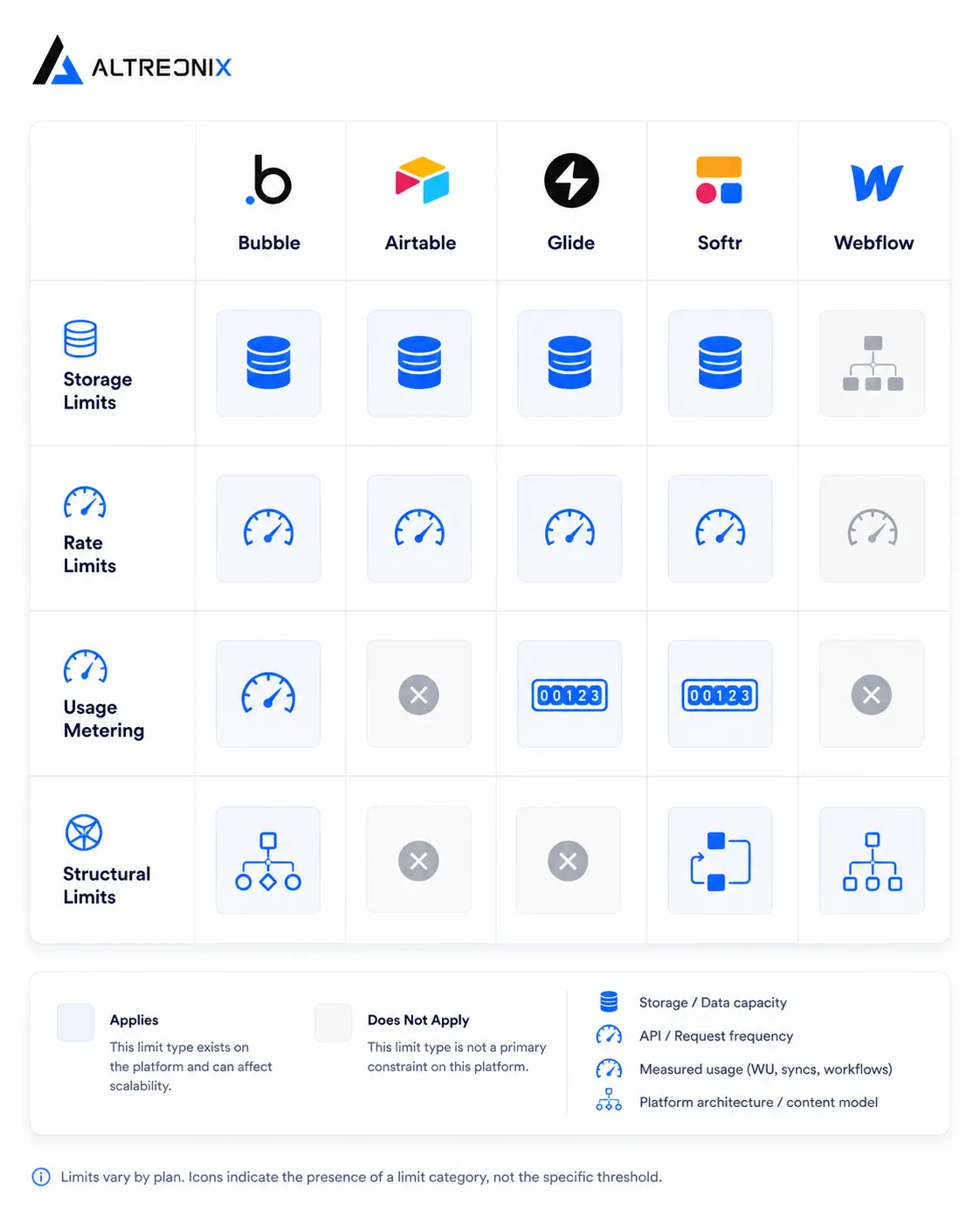
Once you look at all five side by side, the limits stop looking arbitrary and start looking like three recurring categories.
Hard ceilings. A fixed number you cannot exceed at any price without changing plans or platforms: Airtable’s and Softr’s record caps, Webflow’s reference field and collection list limits.
Rate constraints. A cap on how fast you can move, independent of total volume: Airtable’s five requests per second, Webflow’s roughly sixty requests per minute.
Metered consumption. A cost or functional limit that scales with activity rather than storage: Bubble’s Workload Units, Glide’s update syncs, Softr’s workflow actions.
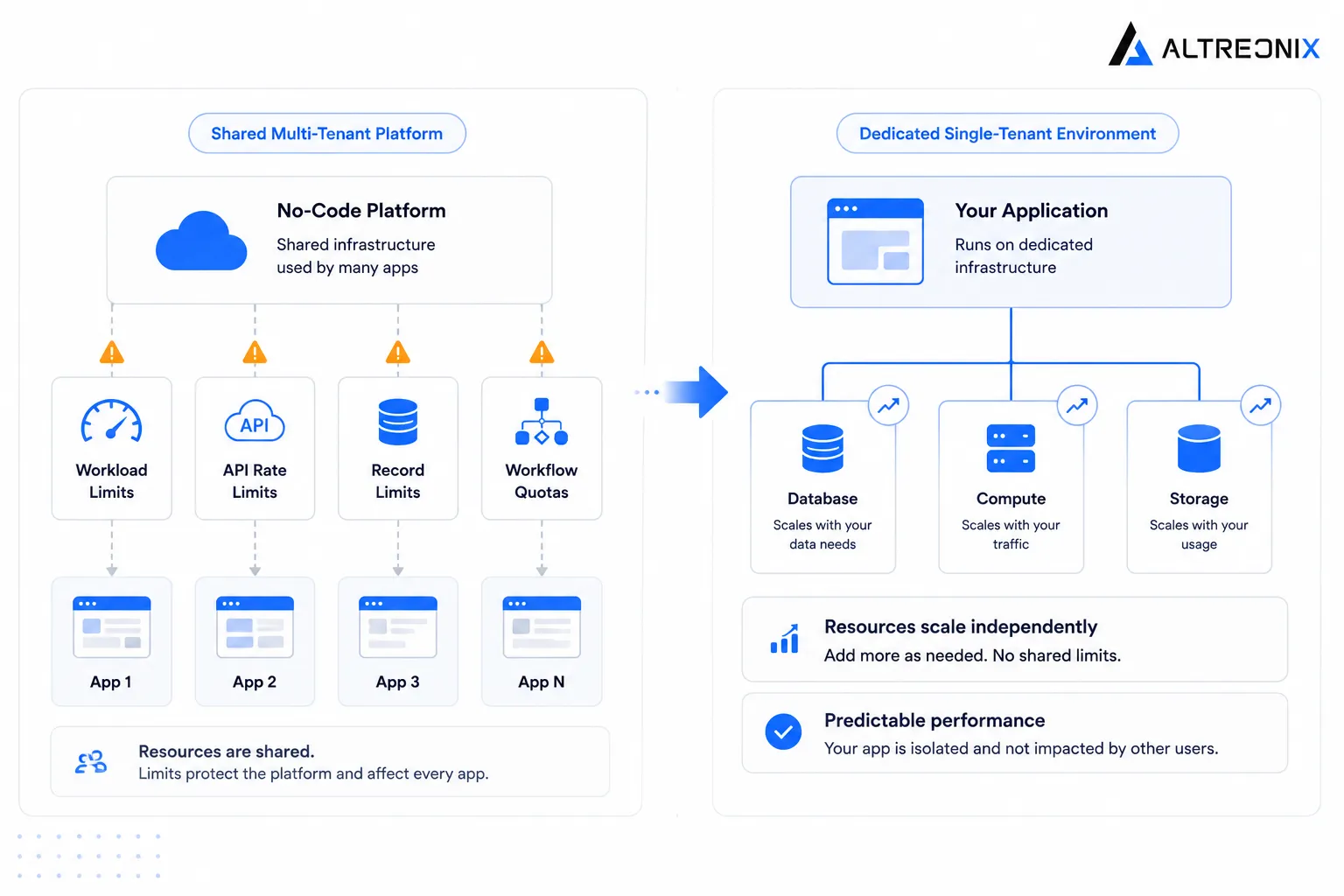
Every one of these exists for the same underlying reason. A visual builder has to guarantee a baseline experience for every user on a shared, multi-tenant system, which means it needs guardrails that a dedicated, custom-coded application simply doesn’t need, because a custom application’s constraints are whatever you choose to build and pay for, not whatever the platform decided in advance to protect its own infrastructure. That’s not a criticism of any of these five platforms. It’s the actual trade-off being made in exchange for not writing code, and it’s worth understanding clearly rather than discovering it one ceiling at a time.
It’s worth being specific about what “shared, multi-tenant” actually means here, since it’s the root cause underneath every limit above. When you build on Bubble, Airtable, Glide, Softr, or Webflow, your app runs on infrastructure shared with every other customer on that platform, not a server or database dedicated to you alone. The platform has to protect that shared infrastructure from any single customer’s app consuming more than its fair share, whether through runaway queries, excessive API calls, or unbounded data growth. That protection is exactly what shows up as a Workload Unit meter, a five-requests-per-second cap, or an update allowance. A custom-coded application, by contrast, typically runs on infrastructure provisioned specifically for it, so the only real limits are the ones you choose to pay for. That’s not automatically better, dedicated infrastructure costs more to run and maintain from day one, but it explains why these particular ceilings exist on no-code platforms in the first place, and why they don’t simply disappear on a more expensive plan.
What This Means in Practice
None of these mechanisms are reasons to avoid no-code tools. They’re reasons to know, specifically, which ceiling your business is closest to, rather than experiencing the effect of hitting one without understanding why it happened.
If you haven’t already, our diagnostic post walks through how to check where your own stack stands against these limits in practice. This post exists to explain the mechanism behind those checks, so that when you see “getting close to a record limit” or “workflows patched with too many integrations,” you understand exactly what’s happening underneath, and why the next plan tier, or eventually a migration, is the only real fix.
How We Think About This at Altreonix
When we evaluate a client’s no-code stack, we don’t just look at which plan they’re on, we look at which of these specific mechanisms is actually constraining them, because the fix is different depending on the answer. A Bubble app slowed by unoptimized searches needs a different intervention than an Airtable base approaching its record cap, and both are different from a Webflow site that’s structurally outgrown what a CMS can model. Our Web Applications and Business Systems work starts with that specific diagnosis, not a generic recommendation to rebuild everything.
If you want a second opinion on which of these mechanisms is actually limiting your app, that’s a reasonable place to start a conversation with us.