Introduction
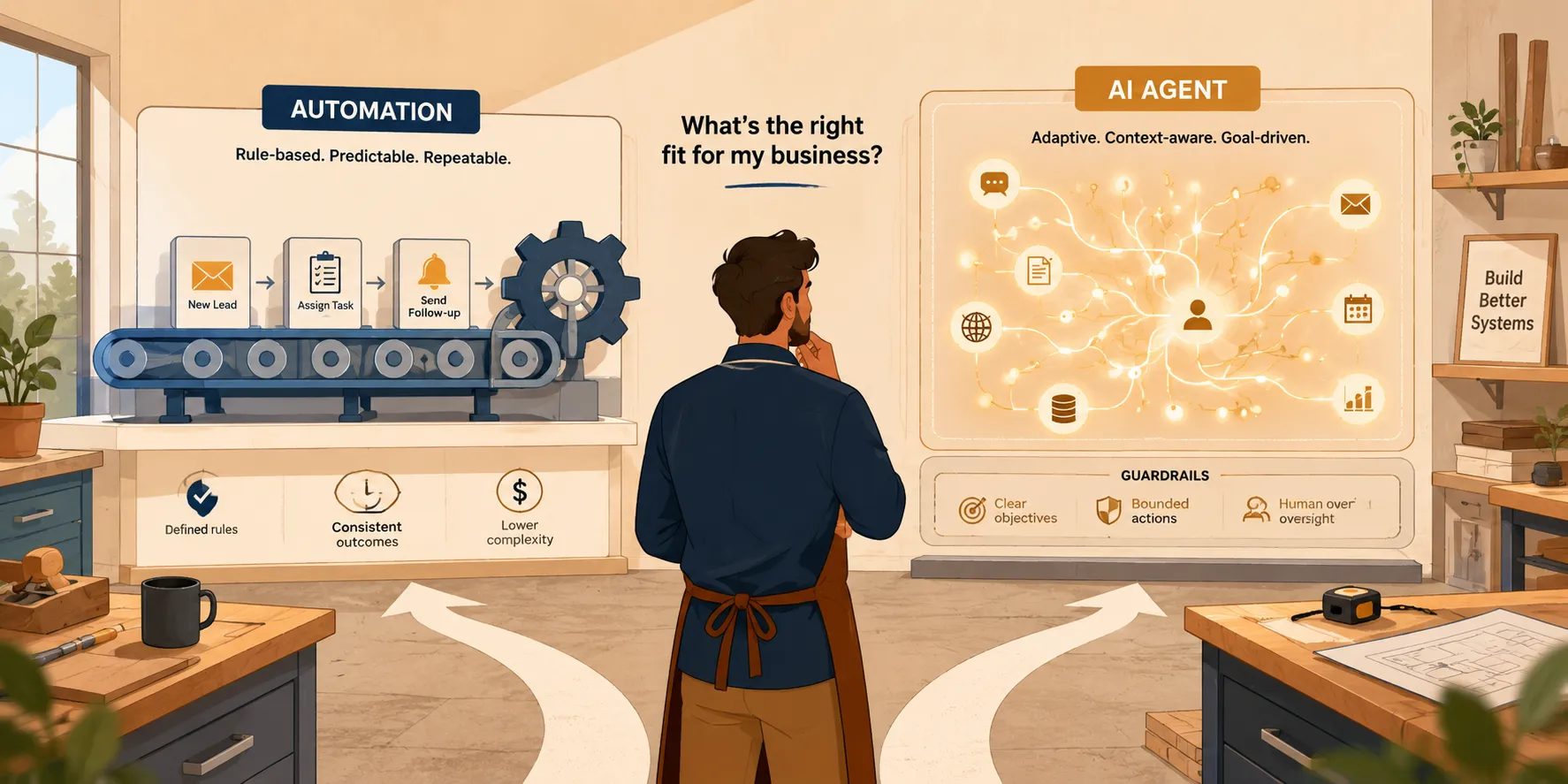
Every founder we talk to right now is getting the same pitch from somewhere: hire an AI agent, replace your team, automate everything. Almost none of it comes with a straight answer about when that’s actually true.
Here’s the real picture. Most small businesses that are winning with AI right now aren’t running autonomous agents across the whole operation. They’re making a series of small, specific calls: this task gets a simple automation, this one gets an AI layer, this one stays manual for now. The businesses getting burned are usually the ones that skipped that decision and bought the hype instead.
We’ve built websites, brand systems, and internal tooling for small and mid-market businesses long enough to have opinions on this that aren’t just theoretical. This guide is our attempt to give you a plain-English way to tell automation, AI agents, agentic workflows, and RPA apart, and more importantly, a framework for deciding which one (if any) fits a given task in your business.
Why This Is Confusing Right Now
Part of the confusion isn’t your fault. The terms genuinely get used interchangeably in marketing copy, and the underlying technology has moved fast enough that a lot of the explainer content out there is already out of date.
Here’s what’s actually happening in the market: adoption of AI in small businesses has become the norm rather than the exception. A synthesis of Salesforce, PayPal, and McKinsey survey data found that most SMBs globally have already adopted AI in at least one part of the business, and the large majority of those adopters report both revenue growth and operational improvements as a result of that adoption. Separately, PayPal’s own 2025 research found the vast majority of small business owners now see AI as essential to staying competitive, which is a big part of why the pressure to “do something with AI” feels so loud.
At the same time, the data on AI agents specifically is more mixed than the hype suggests. Across organizations of all sizes, most are still experimenting with agents rather than running them at meaningful scale, and only a small share have gotten agents deployed broadly enough to call them scaled operations, according to recent adoption research. That gap between “everyone’s talking about agents” and “most projects are still pilots” is exactly why a decision framework matters more than a trend piece.
The Four Things People Lump Together
Before you can decide what to build, it helps to actually separate these four ideas, because they behave very differently in practice.
| Concept | What it does | Best fit | Predictability |
|---|---|---|---|
| Traditional automation (Zapier, Make, n8n) | Watches for a trigger, then runs a fixed set of actions | High-volume, stable, rule-based tasks | Very high |
| RPA (robotic process automation) | Mimics a human clicking through a UI | Legacy systems with no API | Moderate, breaks when UIs change |
| AI agents | Interprets a goal, plans steps, uses tools, adjusts as it goes | Unstructured input, judgment calls | Lower, needs guardrails |
| Agentic workflows | An agent orchestrating a mix of automations and tools toward an outcome | Multi-step processes with some ambiguity | Moderate, depends on design |
Traditional Automation: The Fixed Playbook
This is Zapier, Make, n8n, and similar tools. They connect apps through triggers and actions: when a new lead fills out your form, add them to the CRM, send an intro email, and ping you in Slack. There’s no interpretation happening. It runs the same three steps every single time, which is exactly the point. Zapier’s own material on workflow automation describes this well: the value is reliability at volume, not intelligence.
RPA: The Robot That Clicks Like You Do
Robotic process automation mimics what a person does inside a screen: logging in, clicking fields, copying data, pasting it somewhere else. It exists because some systems, especially older government portals or legacy software, don’t expose an API to connect to. RPA fakes the human interaction instead. It’s a useful tool of last resort, but it’s notoriously fragile when the underlying interface changes, and it tends to be more expensive to build and maintain than an API-based automation.
AI Agents: The Junior Operator Working Toward an Outcome
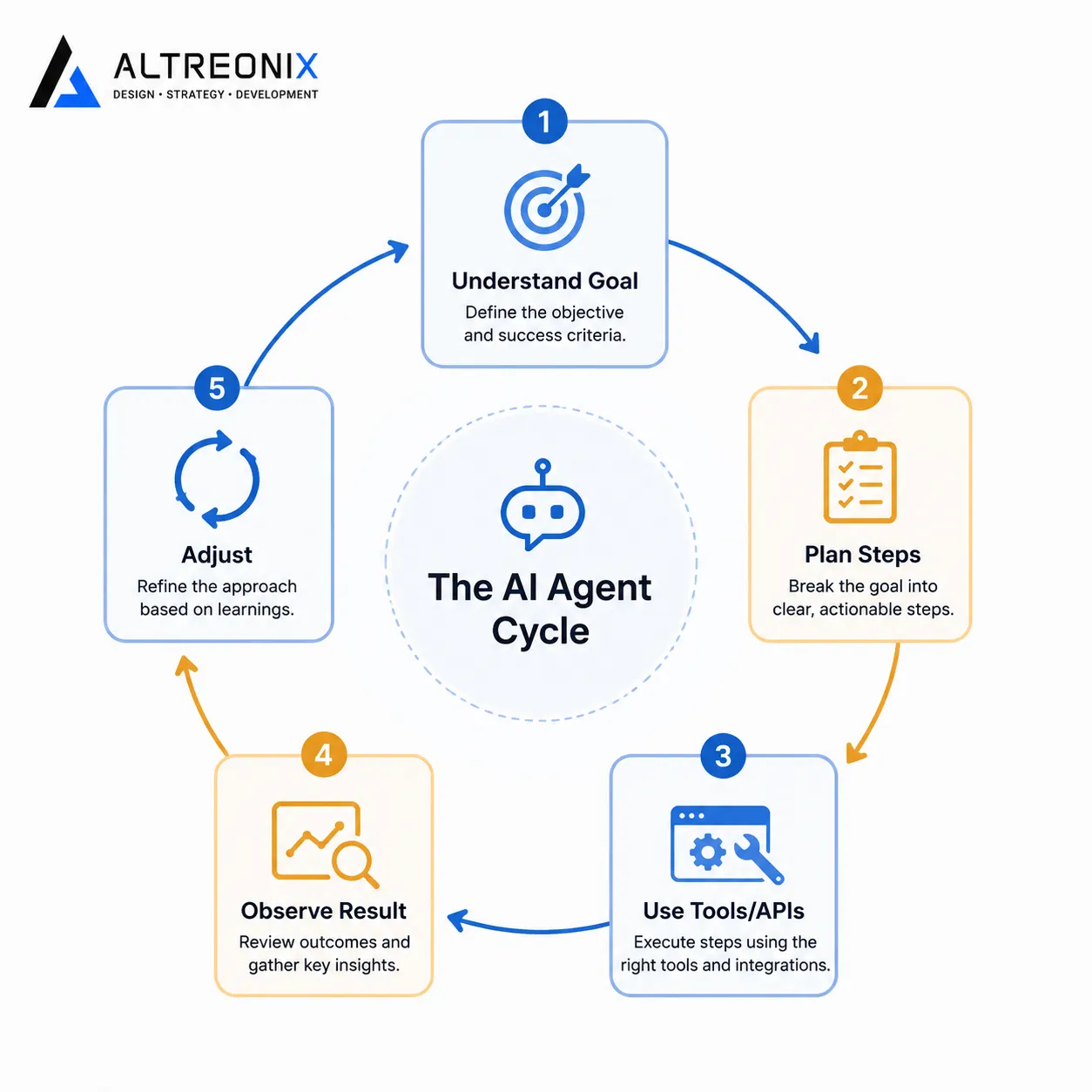
An agent is goal-driven rather than instruction-driven. Instead of “do X then Y,” you’re telling it “get this invoice reconciled” or “move this lead to the next stage,” and it figures out the steps. Analyst research describes this as a loop: the agent understands the goal, plans a sequence of actions, calls tools or APIs to execute them, observes what happened, and adjusts if needed, largely without a human walking it through each step. This is the definition Gartner has been using in its technology trend coverage, and it’s a genuinely different mode of operating than a fixed automation.
Agentic Workflows: The Coordination Layer
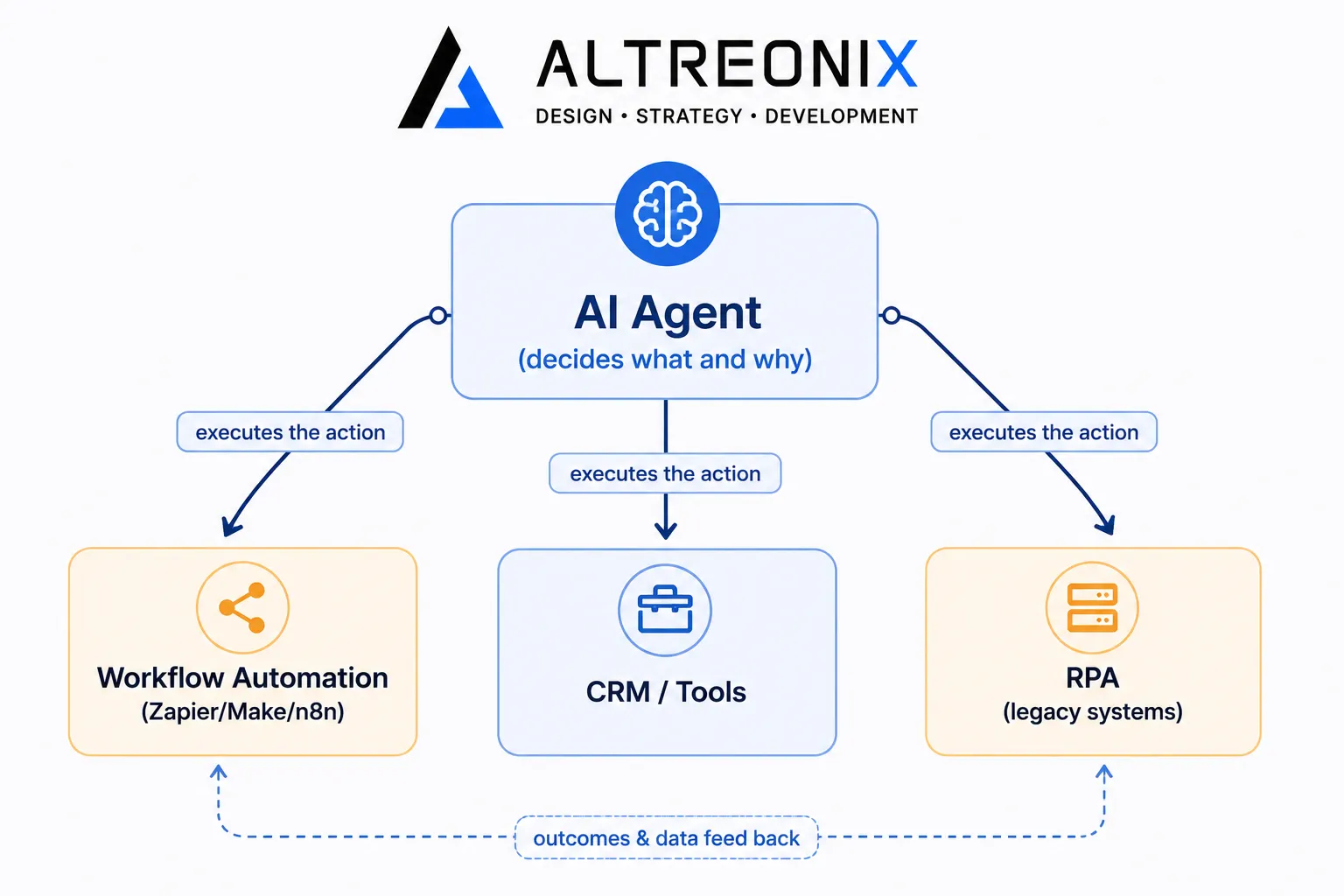
This is where it gets more useful for real businesses. An agentic workflow is a process where one or more agents make the decisions about what happens next, and then hand off execution to your existing automations and tools. The agent figures out the “what” and the “why.” The automation underneath does the actual clicking and moving of data. That separation matters a lot for risk, which we’ll get to.
What Changed in the Last Year
If you feel like this conversation got louder recently, that’s not just perception. Software vendors are actively embedding task-specific agents directly into the tools SMBs already use, meaning you’ll increasingly encounter agent-style features inside your CRM or helpdesk whether you go looking for them or not, a shift analysts have been tracking closely.
The flip side of that same coverage is the part vendors don’t lead with: a large share of agentic AI projects are projected to be cancelled over the next couple of years, largely because of escalating costs, unclear business value, and weak risk controls, not because the underlying tech doesn’t work. That’s the honest version of where things stand. Agents are real and useful. They’re also easy to over-scope, and a lot of companies are learning that the hard way.
For your business, the practical takeaway is this: the question isn’t “should we use AI.” Your tools will increasingly ship with it built in. The real question is how carefully you design the process around it.
Real Capabilities vs. Marketing Claims
This is the part most explainer content skips, and it’s where we think the actual value of this guide sits.
Where Simple Automation Genuinely Wins
For high-volume, low-variance tasks, plain automation is still the better tool, full stop. Syncing leads, sending confirmation emails, generating scheduled reports, alerting you when a payment fails. These are structured, repetitive, and low-risk if something minor goes wrong. There’s no reason to put an agent on top of a task like this. It adds cost and unpredictability for zero upside.
Where AI Agents Are Genuinely Better
Agents earn their place when the input is messy and a human would otherwise have to read it, interpret it, and decide what to do. Support tickets are a good example: an agent that reads the full thread, checks account history, and decides whether to draft a reply, escalate, or update a record is doing something a fixed automation structurally can’t, because the automation has no way to “read” the ambiguity. Practical writeups on this kind of deployment describe agents triaging support conversations this way, cutting down the manual reading and decision-making that used to sit entirely with a person.
 We’ve seen the same pattern in sales tooling. A standard automation can push a new lead from an ad platform into your CRM. An agent layered on top of that same CRM can look at engagement history and decide the right channel and timing for the next outreach, which is a judgment call, not a lookup. Independent comparisons of these two approaches side by side have found exactly this kind of split in real deployments: the automation handles the mechanical part, the agent handles the part that used to require a person’s judgment.
The Hybrid Pattern That Actually Works
The most credible guidance we’ve seen for 2025 and 2026 isn’t “agents instead of automation.” It’s agent plus automation, working together. The agent decides what should happen. The automation does the actual clicking, moving, and updating, inside a sandbox with clear limits. This is also, frankly, the pattern that fits how we build things for clients: you already have systems and tools in place, and an agent layer sits on top of that as an intelligent coordinator rather than a replacement for everything underneath it.
 ### What Agents Shouldn’t Be Doing Yet, Even If They Can
There’s a difference between “an agent is technically capable of this” and “you should let it.” Fully unsupervised access to bank transfers, contract terms, or pricing changes is a bad idea right now, not because the model can’t attempt it, but because the cost of a mistake is high and the guardrails most SMBs have in place aren’t built for that level of autonomy. Any agent touching money, legal terms, or customer-facing commitments needs approval thresholds, logging, and a way to shut it off.
How Peers Are Actually Using This
We’re not going to drown you in stats here (we’ve got a full post coming on real use cases), but three patterns show up consistently across SMBs that are getting genuine value out of this:
- Customer service first. It’s usually the first place SMBs deploy AI, and the payback tends to be fast, often inside a single quarter, because tier-one support volume is high and repetitive enough for AI to meaningfully reduce cost.
- Marketing and lead follow-up second. Businesses report strong willingness to automate content creation and routine customer inquiries, since these are high-frequency, lower-risk touchpoints.
- Admin and back office third. Data entry, CRM updates, and document processing tend to come later in the sequence, once the business has some confidence from the earlier wins, and the error reduction here is often dramatic once it’s automated well.
The overall revenue and efficiency gains reported by AI-adopting SMBs are real and well-documented, but they consistently show up for businesses that picked a specific, well-scoped workflow rather than trying to “add AI” everywhere at once.
The Decision Framework: Automation, Agent, or Neither
This is the part worth bookmarking. Instead of asking “should we use AI agents,” ask these five questions about the specific task in front of you.
- Is the process stable? Do the steps stay the same, or do they change often?
- Is the input structured or unstructured? Form fields and known event triggers vs. emails, calls, and documents.
- How often does it hit an exception? Rare edge cases vs. constant “it depends.”
- What’s the downside if it’s wrong? Minor annoyance vs. financial or legal exposure.
- What’s the real math? Frequency times minutes saved times error cost, not just a gut feeling that “this should be automated.”
| If the task looks like… | Go with… | Example |
|---|---|---|
| Stable steps, structured input, few exceptions | Classic automation | New booking on your site triggers a calendar entry and confirmation email |
| Structured task, no API available, repetitive UI work | RPA, sparingly | Pulling weekly reports from a legacy government portal |
| Unstructured input, real judgment involved, moderate risk | AI agent with a human in the loop | An agent reads partnership inquiry emails and drafts replies, a person approves before sending |
| Low frequency, high ambiguity, unclear payoff | Don’t automate yet | A process you’ve run twice and haven’t stabilized |
The math in that fourth row matters more than founders usually expect. Low-frequency, ambiguous processes are exactly where over-engineering happens: businesses build an agent for something that happens six times a year, when the actual fix is tightening up the manual process first and revisiting automation later. Reports on RPA specifically back this up: a meaningful share of RPA deployments stall or fail to scale, largely because bots got layered onto processes that were never redesigned in the first place.
Where Most SMBs Should Actually Sit
We think about this in three rough levels, and most small businesses should be spending most of their time and budget in the first two.
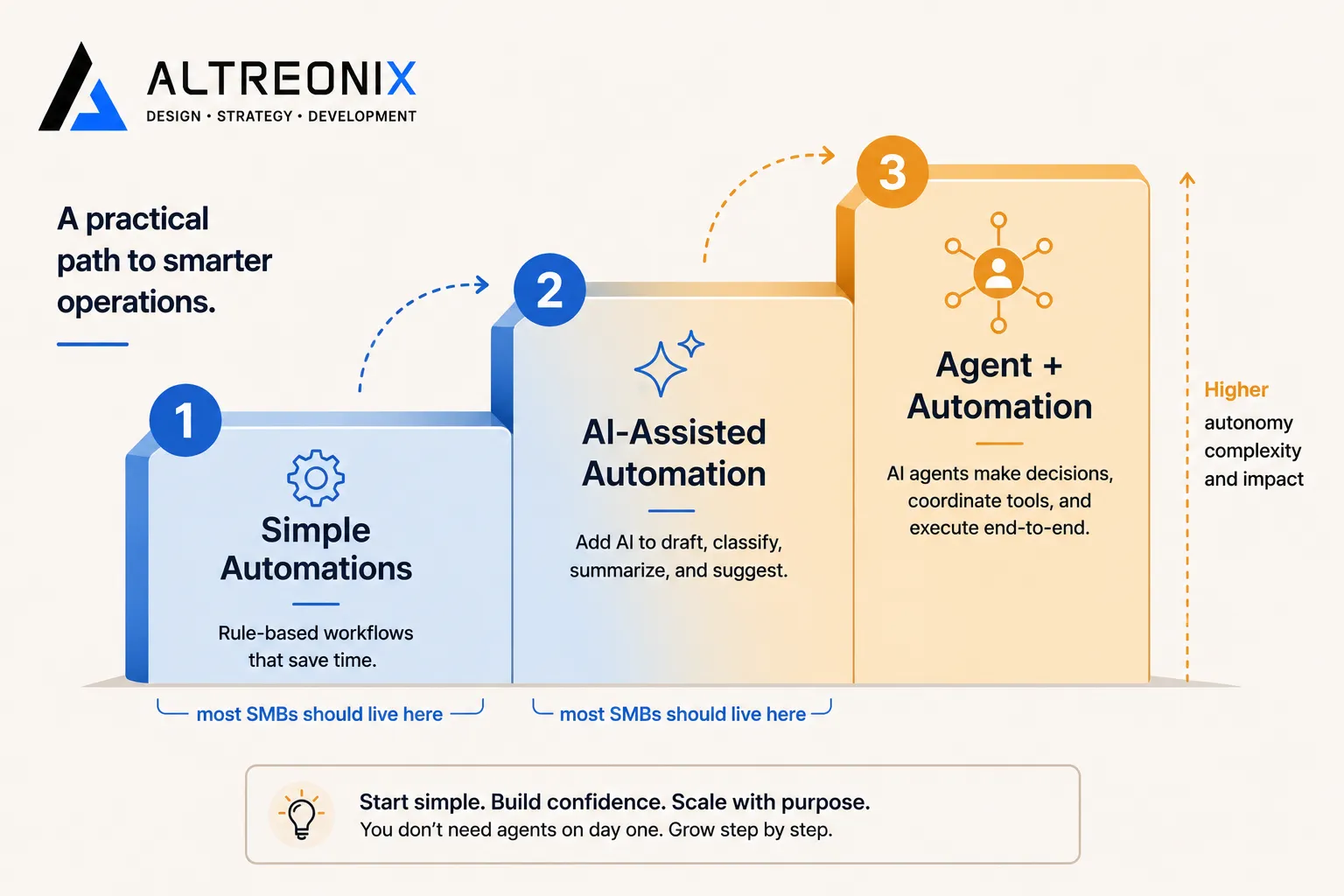 - Level 1, simple automations. Lead capture into a CRM, form responses routed to a shared inbox, failed payment alerts. Cheap, fast to set up, and reliable.
- Level 2, AI-assisted automation. A workflow tool triggers an AI step: summarizing a support ticket, drafting a first-pass response, categorizing a lead. The human still reviews and sends.
- Level 3, agent plus automation. A small number of carefully chosen workflows where an agent plans and coordinates, and automations execute under supervision.
Most of the businesses we’ve seen get real ROI are living almost entirely in Levels 1 and 2, with maybe one or two Level 3 use cases where the ambiguity and payoff both genuinely justify it. That’s a very different picture than “deploy an autonomous agent across the business,” and it’s the honest one.
The Traps Worth Avoiding
We’ll go deeper on this in a dedicated post, but three failure patterns show up again and again:
- Starting with a vague goal. “We should use AI” isn’t a project. “Cut ticket response time on billing questions” is. Projects tied to a fuzzy goal are disproportionately the ones that get cancelled, and analyst research points to exactly this as one of the biggest reasons agentic projects get shelved.
- Buying RPA when a simple integration would do. RPA is the right tool sometimes, but it’s frequently used as an expensive patch for a process that should have been redesigned around an API-first workflow tool instead.
- Skipping guardrails. No audit logs, shared admin logins, an agent with more permission than the task requires. These aren’t hypothetical risks, they’re the specific gaps that show up in post-mortems of failed deployments.
How We Approach This With Clients
We don’t start with “let’s add an agent.” We start with the workflow itself.
In practice, that looks like mapping the handful of processes in a business that get hit most often and cost the most time or error when they go wrong, then matching each one against the framework above. Often the first fix is a straightforward workflow automation that removes friction we spot in the process or the tooling around it. Where there’s a genuine case for something smarter, that’s where our AI solutions work comes in, layering an AI-assisted step or, in the right cases, a properly guarded agent, into the systems a business already runs on rather than bolting on a separate “AI product.” Agents only get proposed once there’s a clear, measurable case for one, with guardrails built in from day one rather than added after something goes wrong.
Where to Go From Here
The short version of everything above: use automation for the repeatable, predictable parts of your business, and reserve agents for the messy, judgment-heavy parts where a human is currently doing the interpreting. Don’t try to automate everything at once. Pick one or two workflows, get them right, and expand from there based on what you actually learn.
If you’re trying to figure out which of your own workflows falls into which category, that’s exactly the kind of assessment we do with clients before recommending anything. You can take a look at our AI solutions work to see how we approach this, or reach out and we’ll walk through your specific setup together.