Introduction
If you’re still weighing whether to invest in agents or automation at all, start with our AI Agents vs Automation guide first. This post assumes you’re past that question and need to make an actual stack decision: which category of tool, which vendor pattern, and which architecture, for a specific process you’re about to build.
That decision gets expensive to get wrong. We’ve seen SMBs sink real budget into RPA bots for processes that had a perfectly good API sitting right there, and we’ve seen the opposite too, teams hand-rolling agentic systems for tasks that a two-step Zapier flow would have solved for a fraction of the cost and none of the maintenance risk. The confusion isn’t really about what these tools do. It’s that “automation” gets used as an umbrella term covering three genuinely different execution models, each with a different cost structure, a different failure mode, and a different skill set required to keep it running.
This post goes deeper than our pillar guide on purpose: maintainability, change risk, vendor lock-in, and the actual technical tradeoffs behind each category. If you’re the person who has to build or maintain whatever gets chosen, this is the version written for you.
The Three Categories, Defined Precisely
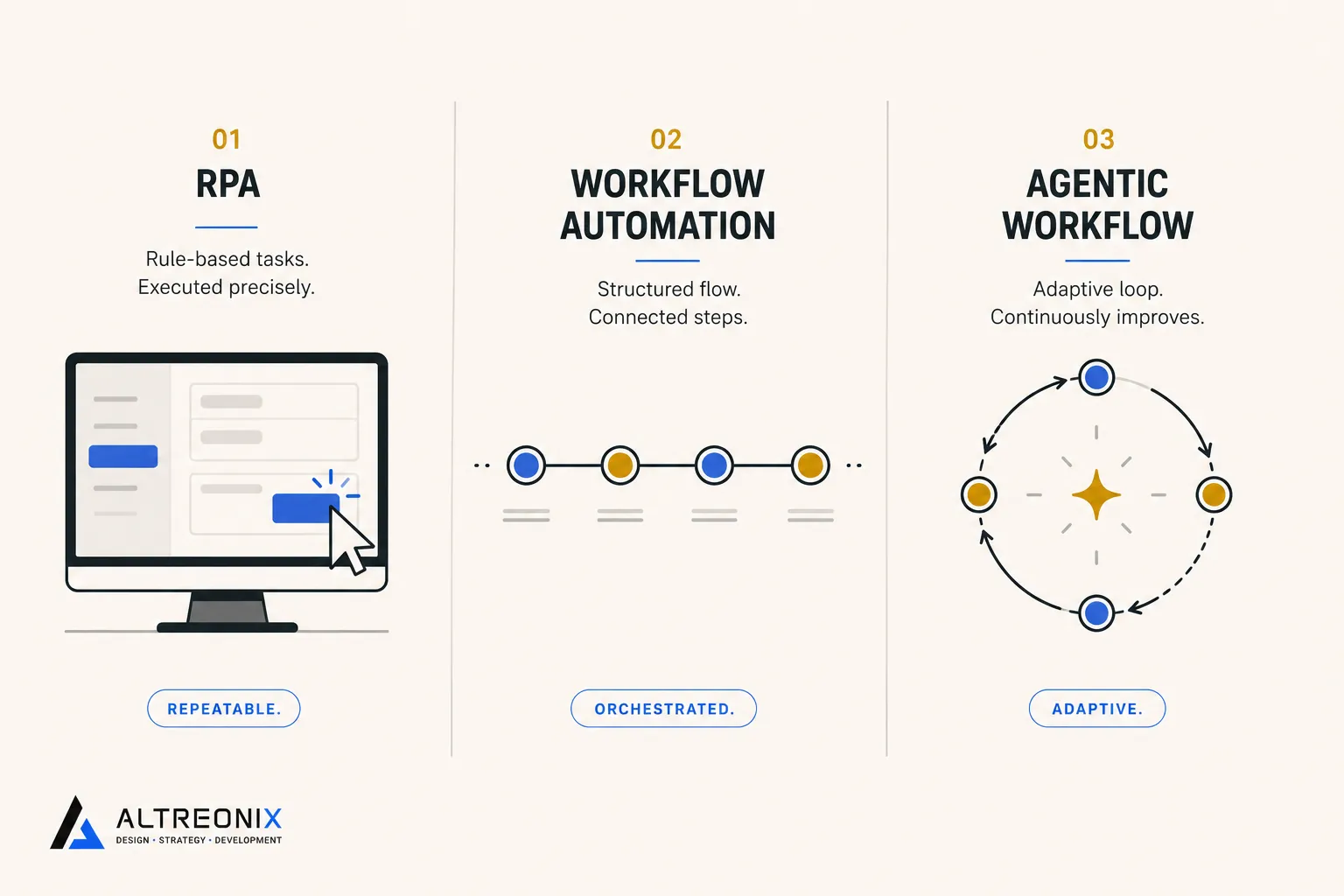
RPA: Scripted Bots That Operate a UI
RPA tools (UiPath, Automation Anywhere, Blue Prism, and similar) automate a process by mimicking the literal keystrokes and mouse actions a human would perform: log in, click this field, read that value, copy it, paste it somewhere else. There’s no interpretation of what’s on screen beyond coordinate- or pattern-based recognition. The bot is running a recorded or scripted sequence against a UI it doesn’t actually understand, which is exactly why it exists in the first place: it’s the tool of last resort for systems that expose no API, commonly legacy government portals, old ERP terminals, or internal tools nobody’s touched in a decade. RPA is genuinely useful in that narrow lane, and genuinely the wrong tool everywhere else.
Workflow Automation / Integration Platforms: Trigger-Action, API-Based
Zapier, Make, n8n, and Workato sit in a different category entirely. These connect applications through their APIs: a trigger fires (a form submission, a new row, a webhook), and a defined sequence of actions runs against that trigger every time, identically. There’s no UI simulation happening, no screen scraping, just structured data moving between systems that were built to talk to each other. This is what most people actually mean when they say “we automated that,” and it’s the backbone of most SMB tech stacks for exactly this reason: it’s fast to build, cheap to run, and predictable to test.
Agentic Workflows: Goal-Driven Orchestration With a Reasoning Loop
An agentic workflow is a process where an LLM-based agent sits at the decision point instead of a fixed rule. Gartner’s framing is useful here: agentic AI systems act as goal-driven digital coworkers that plan, decide, and act with minimal supervision, combining a model with memory, tools, and guardrails. Structurally, the agent runs a loop: interpret the goal, plan a sequence of steps, call tools or APIs to execute them, observe what happened, and adjust if the result doesn’t match what was expected. Underneath, that agent is usually calling the exact same APIs a workflow tool would call. The difference is who’s deciding what to call and in what order, a fixed sequence written by a human, or a model reasoning about it at runtime.
Worth naming directly: the line between these categories is blurring on purpose. Workflow platforms are actively embedding agent-style steps directly into their builders now, Zapier and Make have both shipped native AI/agent nodes that let a reasoning step sit inside what’s otherwise a standard trigger-action flow. That’s not a separate fourth category, it’s the hybrid pattern this post ends up recommending, built directly into the tools you probably already use.
Execution Model: Deterministic vs Probabilistic
This is the single most important technical distinction between these three categories, and it’s the one that gets glossed over most often.
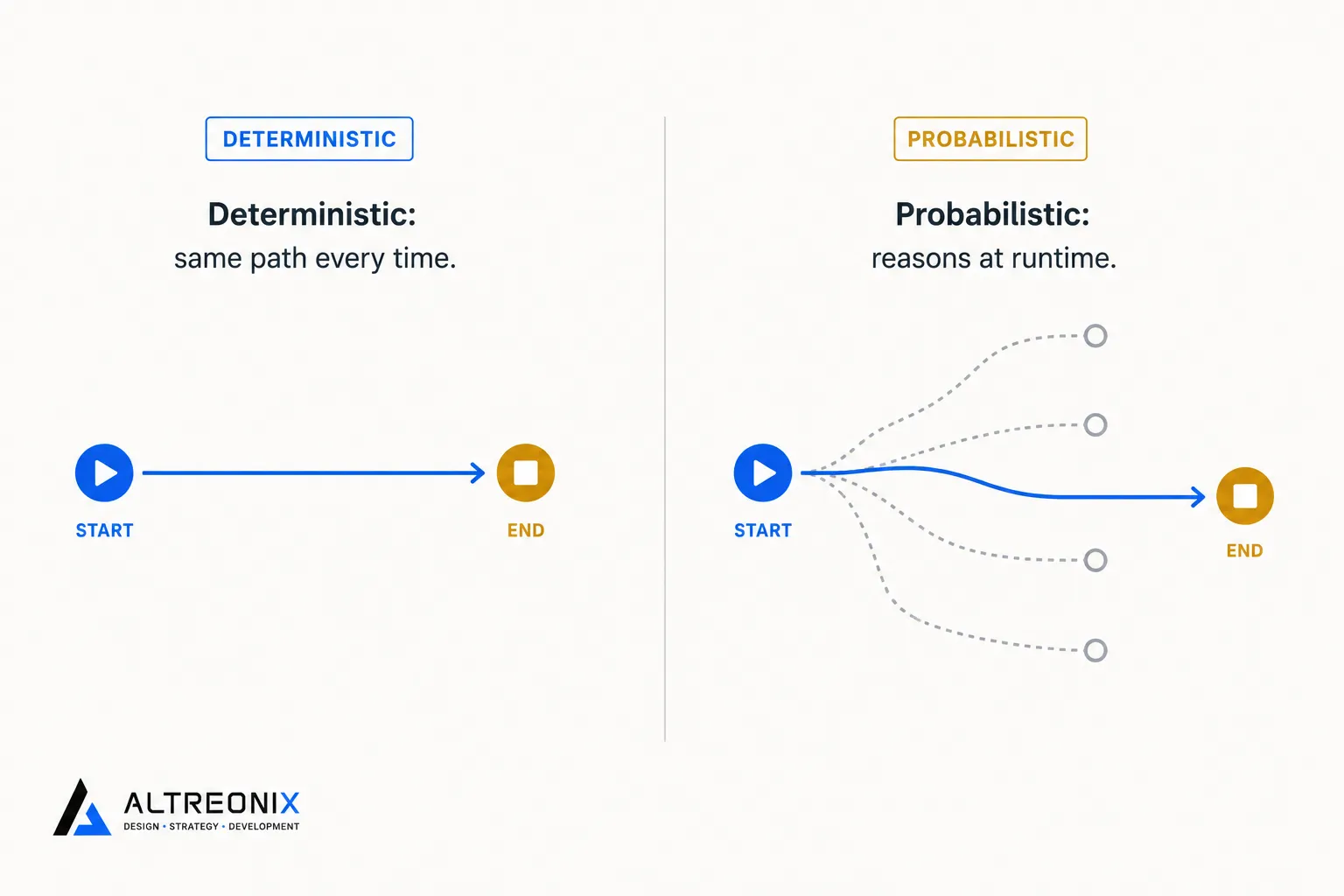 RPA and workflow automation are both deterministic. Given the same input, they run the same steps and produce the same output, every time. That’s a feature, not a limitation, it’s what makes them cheap to test (run it once, verify the output, done) and easy to reason about when something goes wrong (the log shows you exactly which step failed).
Agentic workflows are probabilistic. The model is reasoning about what to do at runtime, which means the same input can, in principle, produce a different sequence of tool calls or a differently worded output on different runs. This isn’t a bug to be engineered away, it’s the actual mechanism that lets an agent handle inputs nobody explicitly programmed for. But it has a direct consequence for how you build and test: you can’t just “run it once and confirm it works.” You need an evaluation set, a batch of representative test cases you re-run periodically to confirm the agent’s behavior is still landing within acceptable bounds, because “it worked in the demo” tells you almost nothing about how it’ll behave on the long tail of real inputs.
Cost Structure: Where the Money Actually Goes
| RPA | Workflow Automation | Agentic Workflows | |
|---|---|---|---|
| Primary cost driver | Per-bot/per-license fees, plus build and maintenance labor | Per-task or per-run subscription pricing | Usage-based (tokens/model calls), scales with volume and reasoning complexity |
| Build cost | High, needs process mapping and bot development | Low, mostly configuration | Moderate to high, needs prompt design and tool integration |
| Ongoing maintenance cost | High, UI changes break bots regularly | Low, stable as long as APIs don’t change | Moderate, needs ongoing eval monitoring and occasional prompt tuning |
The RPA line item that catches SMBs off guard isn’t the license, it’s the maintenance labor. Enterprise spending on RPA passed well into the billions in 2025, and yet a large share of those deployments stall or fail to scale, largely because a UI-dependent bot needs continuous babysitting that a workflow automation simply doesn’t. Every time the vendor ships a UI update, there’s a real chance the bot breaks, and someone has to notice, diagnose, and re-record the affected steps.
Agentic workflows have the opposite cost shape: cheap to prototype, but the cost scales with usage in a way that’s easy to underestimate. A workflow automation costs roughly the same whether it runs 10 times or 10,000 times a month (within your plan’s tier). An agent’s cost scales with both volume and how much reasoning it’s doing per run, longer context, more tool calls, and multi-step planning all add up per execution in a way flat-rate automation pricing doesn’t.
Maintainability and Change Risk
Each category breaks in a different way, and knowing which failure mode you’re signing up for matters more than most buying decisions acknowledge upfront.
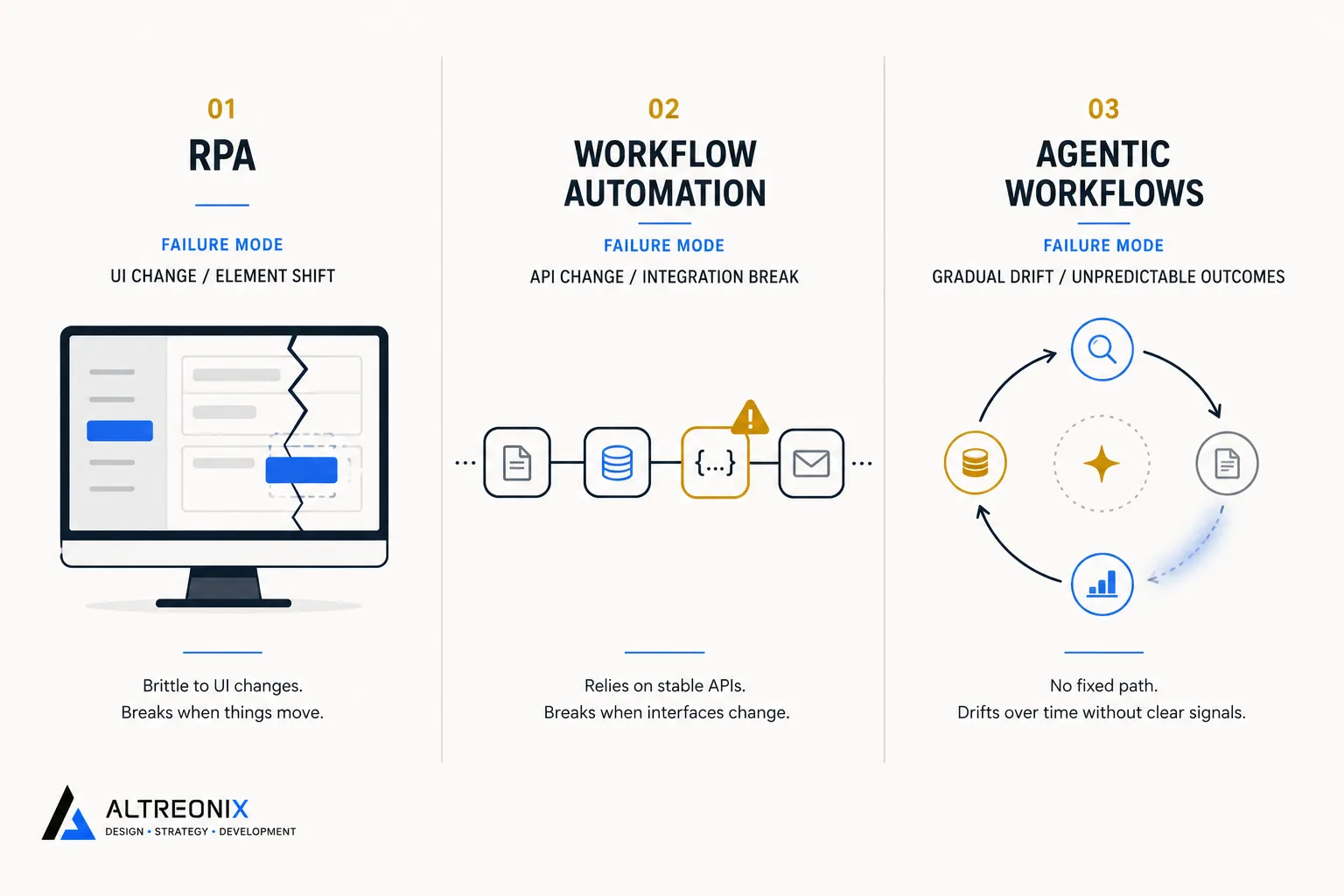 RPA breaks when the UI changes. A button moves, a field gets renamed, a login flow adds an extra step, and the bot is now clicking the wrong thing or failing outright. This is the fragility documented consistently across RPA comparisons, and it’s structural, not a sign of bad implementation. You’re automating against an interface that was never designed to be automated against.
Workflow automation breaks when an API changes or deprecates. This happens far less often and is usually versioned with advance notice, which is a big part of why these platforms are so much lower-maintenance than RPA. The failure mode is also easier to catch: a failed API call throws an error you can alert on immediately, rather than a bot silently clicking the wrong field.
Agentic workflows drift rather than break. This is the failure mode that’s hardest to monitor for, because there’s often no hard error to catch. A model update changes subtle behavior, a prompt that worked well for months starts producing slightly worse outputs as edge cases accumulate, or the agent’s tool-selection logic quietly degrades on a category of input you’re not actively testing for. Catching this requires ongoing evaluation, not just uptime monitoring.
Vendor Lock-In and Portability
This is where the technical comparison should directly inform a buying decision, because the switching cost differs enormously across categories.
- RPA is the most locked-in. Bots are typically built inside a proprietary studio (UiPath Studio, Automation Anywhere’s bot builder), using that vendor’s recorder format and object repository. Migrating to a different RPA vendor generally means rebuilding from scratch, not exporting and re-importing.
- Workflow automation is moderately portable. The underlying logic (trigger, condition, action) maps conceptually across platforms even though the configuration format differs. Moving a Zapier flow to Make or n8n is real work, but it’s translation, not a ground-up rebuild. n8n specifically is worth knowing about here since it’s open-source and self-hostable, which removes platform lock-in entirely at the cost of you (or someone) owning the hosting and updates.
- Agentic workflows are the least locked-in at the model layer, and the most locked-in at the orchestration layer. Since agents call foundation models through fairly standardized APIs, swapping the underlying model provider is often a smaller lift than people expect. What’s harder to move is the orchestration logic itself, if you’ve built extensively on a specific framework’s abstractions (LangChain’s chain structures, CrewAI’s crew definitions), that logic is coupled to that framework’s way of thinking about state and tool-calling, and porting it to a different framework is a genuine rewrite, not a config change.
Independent platform comparisons covering this exact tradeoff space have flagged the same pattern: the newer and more flexible the agent framework, the more the actual lock-in risk sits in the orchestration layer rather than the model itself.
State, Memory, and Governance
RPA and workflow automation are almost entirely stateless per run. Each execution starts fresh, does its job, and ends, with maybe a few variables passed along the way. That statelessness is a big part of why they’re so easy to test and reason about.
Agentic workflows often need real memory, both short-term (context within a single multi-step task) and sometimes long-term (recalling relevant history from previous interactions, usually via a vector store or a structured memory layer). That memory is also where a chunk of the governance burden lives: if an agent is retaining context about a customer across sessions, you need to think about how long that’s retained, who can see it, and how it gets purged, questions that simply don’t come up with a stateless Zapier flow.
Governance more broadly is where agentic workflows need meaningfully more infrastructure than the other two categories. RPA and workflow automation are typically governed by log review and role-based access to the platform itself. Agentic workflows need that plus: least-privilege scoping per action, approval gates for anything with financial or legal weight, a way to audit not just what the agent did but why it decided to do it, and a functioning kill switch. This isn’t optional caution, it’s the direct governance gap analysts point to when they flag agentic project failures as coming from unclear risk controls rather than model limitations.
Skills Required to Build and Maintain Each
- RPA needs process mapping skills and training in that vendor’s specific bot studio. It’s a specialized skill set that doesn’t transfer cleanly between RPA vendors, and it doesn’t transfer to either of the other two categories.
- Workflow automation needs low-code comfort, understanding triggers, conditional logic, and data mapping between systems. Most technical operators pick this up within days, and a lot of non-technical staff manage it comfortably too.
- Agentic workflows need prompt design, tool/function schema design (defining exactly what the agent is allowed to call and what parameters it can pass), and eval design (building a representative test set and a process for reviewing it periodically). This is closer to a lightweight software engineering skill set than a no-code one, even when the actual build happens inside a low-code platform’s new agent-builder features.
When to Choose Each: A Decision Table
| Situation | Right choice | Why |
|---|---|---|
| Legacy system with no API (old government portal, ancient internal tool) | RPA, as a last resort | Nothing else can reach it |
| Stable, structured process with modern SaaS tools involved | Workflow automation | Cheapest to build, cheapest to maintain, fully testable |
| Judgment call involved, moderate stakes, tolerance for occasional review | Agentic workflow with guardrails | Only category that can genuinely interpret ambiguous input |
| High stakes, financial or legal exposure, low tolerance for variance | Workflow automation with a human decision point, not an agent | Determinism and auditability matter more than flexibility here |
| A mix of the above within one process | Hybrid: agent orchestrates, automation executes | Matches each sub-task to the model that actually fits it |
The Hybrid Stack Most SMBs Should Actually Build
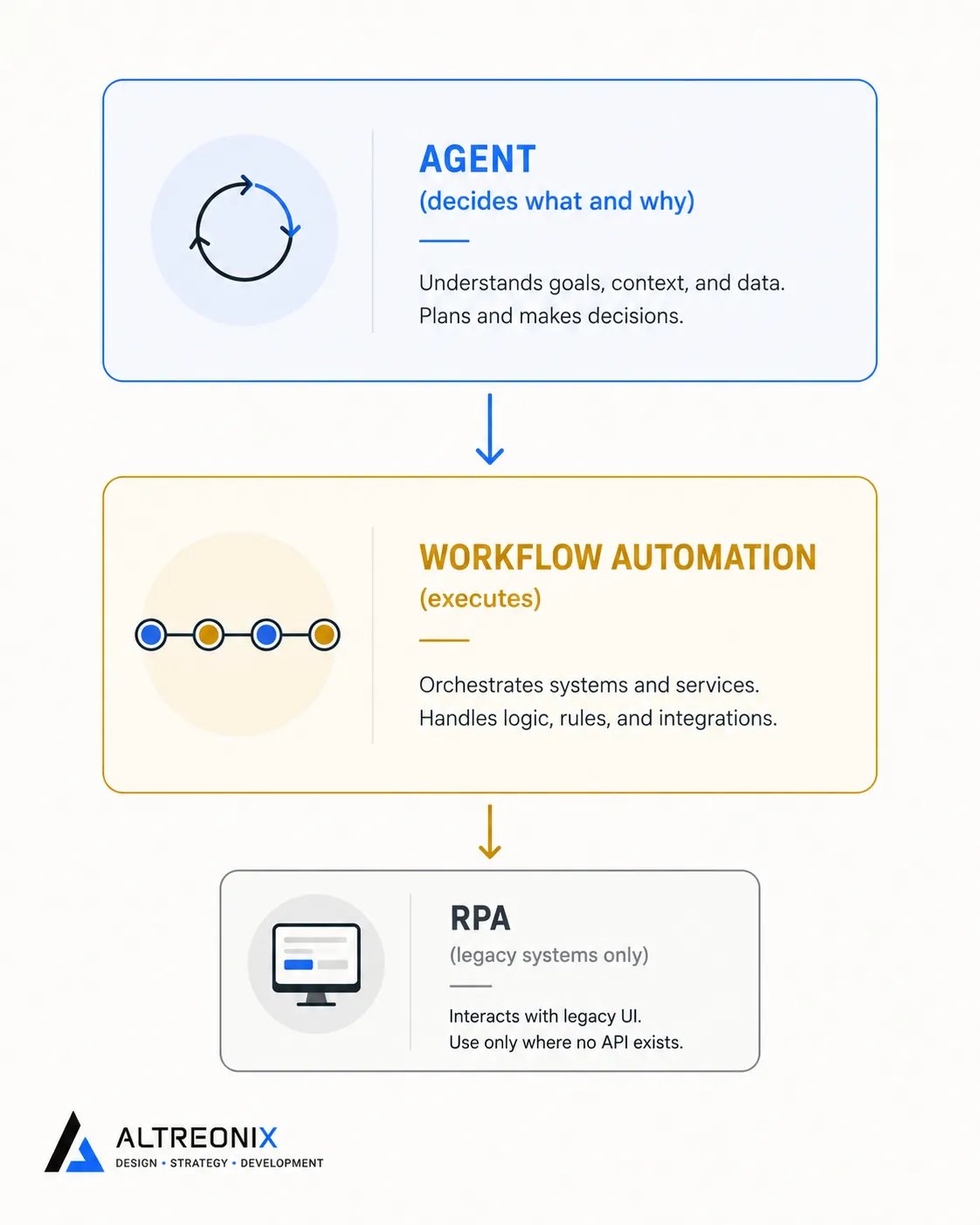
The architecture pattern with the strongest 2025-26 evidence behind it isn’t picking one category and using it everywhere. It’s a layered stack: an agent sits at the decision points that genuinely need judgment, and calls existing workflow automations (or, rarely, an RPA bot for a legacy system) to actually execute the mechanical steps. Practitioner comparisons of agentic patterns against RPA describe this exact layering, the agent as the coordination layer, the automation and RPA as the execution layer underneath it, each doing the part it’s structurally suited for.
A concrete version of this: an agent handling invoice reconciliation doesn’t need to be taught every possible mismatch rule upfront. A real-world test of exactly this pattern, an agent pulling Stripe payments, comparing them against QuickBooks, and flagging inconsistencies, showed it handling ambiguous matches without every rule being hardcoded in advance, while the actual data pulls and record updates still ran through standard API-based automation underneath it. The agent decided what didn’t match and why. The automation did the fetching and updating.
 ## A Quick Checklist to Choose Your Stack
Before you commit to a category for a given process, confirm:
- Does the target system have an API? If no, and there’s genuinely no alternative, that’s your one legitimate case for RPA.
- Does the process require interpreting unstructured input or making a judgment call? If no, don’t reach for an agent, a workflow automation will be cheaper and more reliable.
- What’s the cost of an occasional wrong output? High stakes push you toward keeping a human decision point even where an agent is technically capable.
- Who’s maintaining this in six months, and do they have the skill set the chosen category requires? An agentic system nobody can eval or tune is a liability, not an asset.
- Could this be a hybrid? Most real processes have both a mechanical part and a judgment part. Don’t force the whole thing into one category if it doesn’t fit that way naturally.
How We Approach This With Clients
We map the actual process before recommending a stack, not the other way around. In practice, that means we’re regularly talking clients out of RPA when a workflow automation handles the same job for less money and less ongoing risk, and we only recommend an agentic layer where there’s a genuine, recurring judgment call happening, built with the guardrails covered in our traps and pitfalls guide from day one rather than bolted on afterward. Where that judgment layer is warranted, it’s exactly the kind of work we do through our AI solutions practice, orchestrating on top of the systems you already run rather than replacing them.
Where to Go From Here
The category confusion at the start of this post is genuinely the expensive part. Once you know which execution model, deterministic or probabilistic, a given process actually needs, the vendor choice within that category is a much smaller decision. Match RPA to legacy systems with no API, workflow automation to everything stable and structured, and agentic workflows to the specific judgment calls that justify the added cost and governance overhead.
If you want a second set of eyes on which category fits a process you’re currently trying to build, that’s exactly the kind of technical scoping we do before recommending a stack. Take a look at our AI solutions work, or reach out and we’ll map your specific process together. For the execution plan once you’ve picked a stack, our rollout guide covers the week-by-week build sequence.