Your Website Already Decided Whether You Get the RFQ
Here is an uncomfortable number to sit with: nearly 47% of industrial buyers eliminate a supplier within two minutes of landing on their website, according to a 2023 Forrester/PwC industrial buyer study summarized by Barro Audit. No phone call. No email asking for clarification. Just a closed tab.

That elimination never appears in your CRM. It never shows up as a lost deal. It simply shows up as a shortlist your company was never invited onto.
We audit manufacturer websites for a living, and this pattern is consistent: RFQ volume is rarely a demand problem. It is a qualification problem. The website is where that qualification happens now, whether the manufacturer built it that way or not.
Why Your Website Now Does the Job Your Sales Team Used to Do
Manufacturers still tend to think of their site as a digital brochure that supports sales. The research says otherwise.
Gartner and Forrester's B2B buying research converges on a specific figure: modern buyers complete 70 to 80% of their decision making before they contact a vendor at all. Gartner's own survey of B2B buyers found that any single supplier gets only about 5 to 6% of a buyer's total purchase time when multiple vendors are being evaluated.
For engineering and technical buyers specifically, TREW Marketing and GlobalSpec's longitudinal State of Marketing to Engineers research puts the online research share at 62 to 72% of the buying process, with 73% of technical buyers using supplier websites as their primary source of product information.
Put those two data points together and the conclusion is unavoidable. By the time a buyer calls or submits an RFQ, they have already decided you are worth calling. Your website did that work. If it did the work badly, the call never happens.
Which Mistake Costs You the Most RFQs
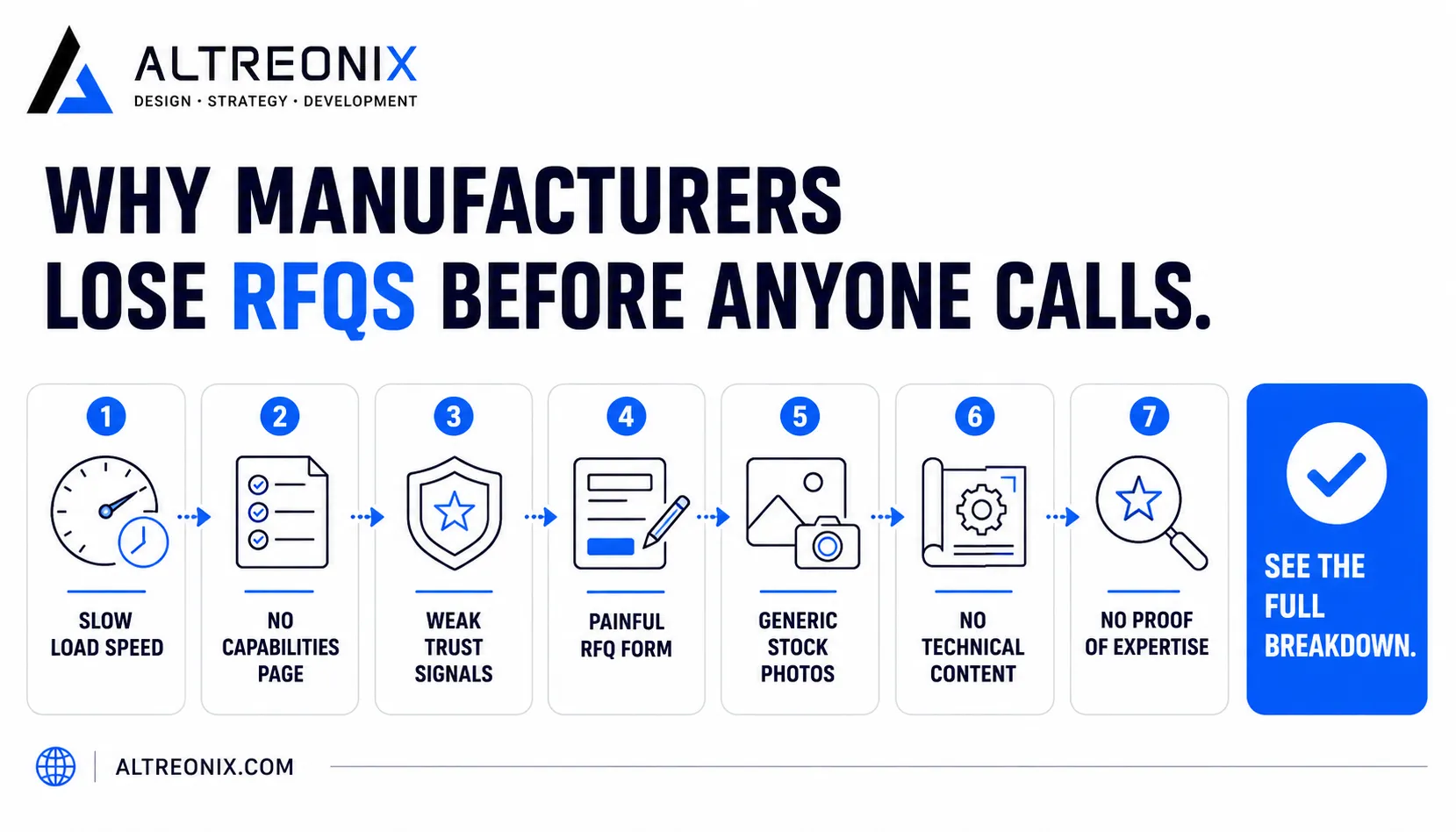
Not all seven mistakes carry equal weight. Based on the strength of the underlying research and the direct impact on RFQ loss, two mistakes function as gatekeepers that determine whether a manufacturer survives the evaluation stage at all. The rest shape how many RFQs come through once a buyer is already engaged.
Rank | Mistake | Evidence Strength (1-10) | Business Impact (1-10) | Typical Fix Difficulty |
|---|---|---|---|---|
1 | No clear capabilities page | 10 | 9 | Moderate |
2 | No technical content (datasheets, CAD) | 10 | 9 | Moderate |
3 | Poor RFQ form experience | 9 | 8 | Moderate |
4 | Slow website performance | 9 | 8 | Low |
5 | No proof of expertise | 8 | 8 | Low |
6 | Weak trust signals | 8 | 7 | Low |
7 | Generic stock photography | 7 | 6 | Low |
The first two mistakes on this list are worth roughly 80% of the attention, because they are the ones that get a manufacturer disqualified before an RFQ ever becomes possible. The remaining five still cost real revenue, but they tend to reduce RFQ volume rather than eliminate it outright.
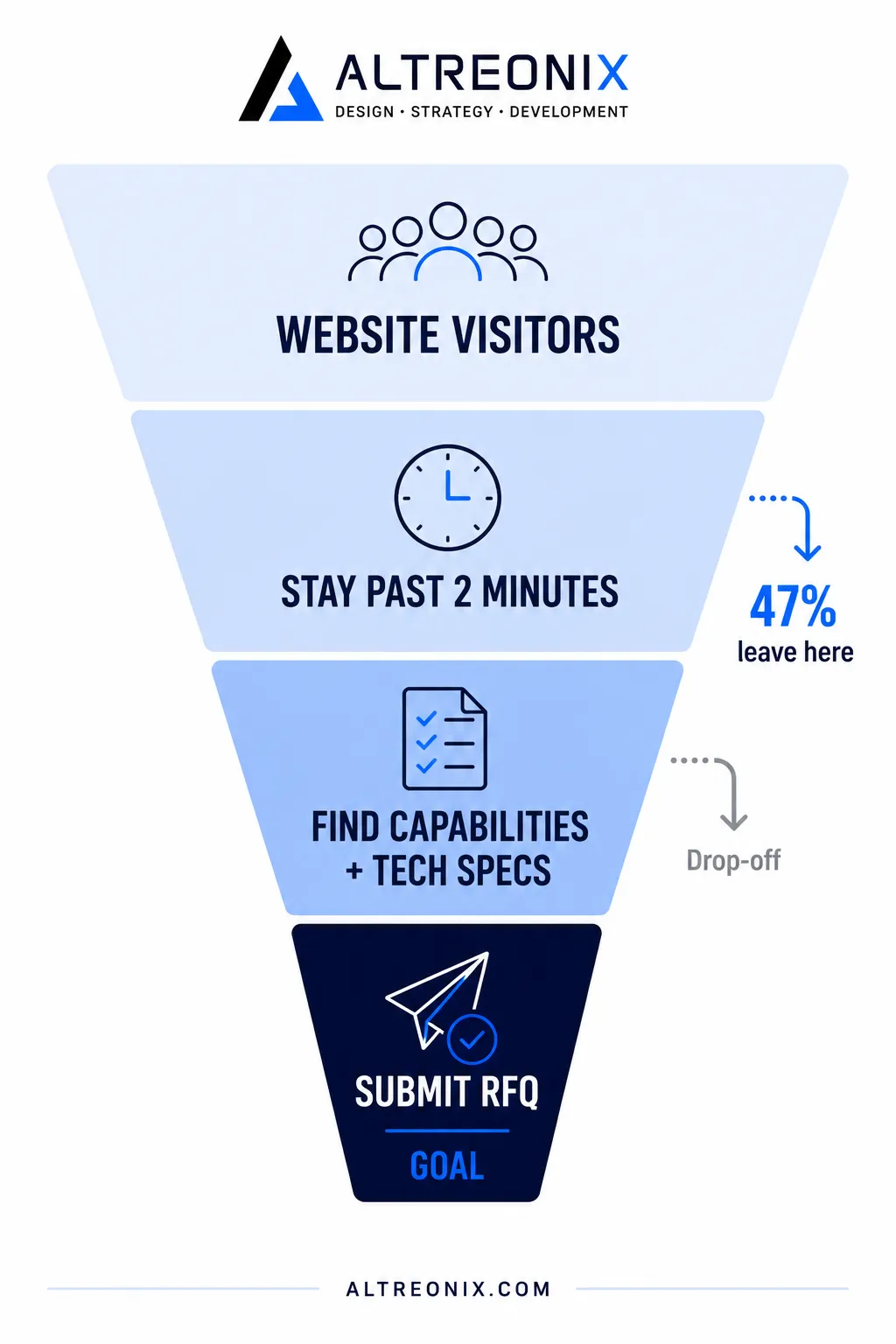
That matters because a weak site does not just look bad. It quietly removes a manufacturer from consideration before a prospect ever fills out a form, sends an email, or picks up the phone. If the buyer cannot quickly understand what you make, what tolerances you hold, what industries you serve, and why you are credible, they move on.
The Two Mistakes That Get You Disqualified Before You Know It
1. No Clear Capabilities Page
Buyers do not call to ask what you can make. They assume that if it is not on your website, you cannot do it, or you are not confident enough to say so.
Thomasnet's long-running industrial buyer research, built on decades of buyer data and work with Strategyn, maps the industrial buying process across six phases (need definition, research, product data research, supplier evaluation, shortlist creation, and purchase) and finds buyers complete more than 225 distinct tasks across that journey, most of them on supplier websites.
The critical finding: buyers who cannot find the information they need do not reach out to ask for it. They simply cross the supplier off the list.
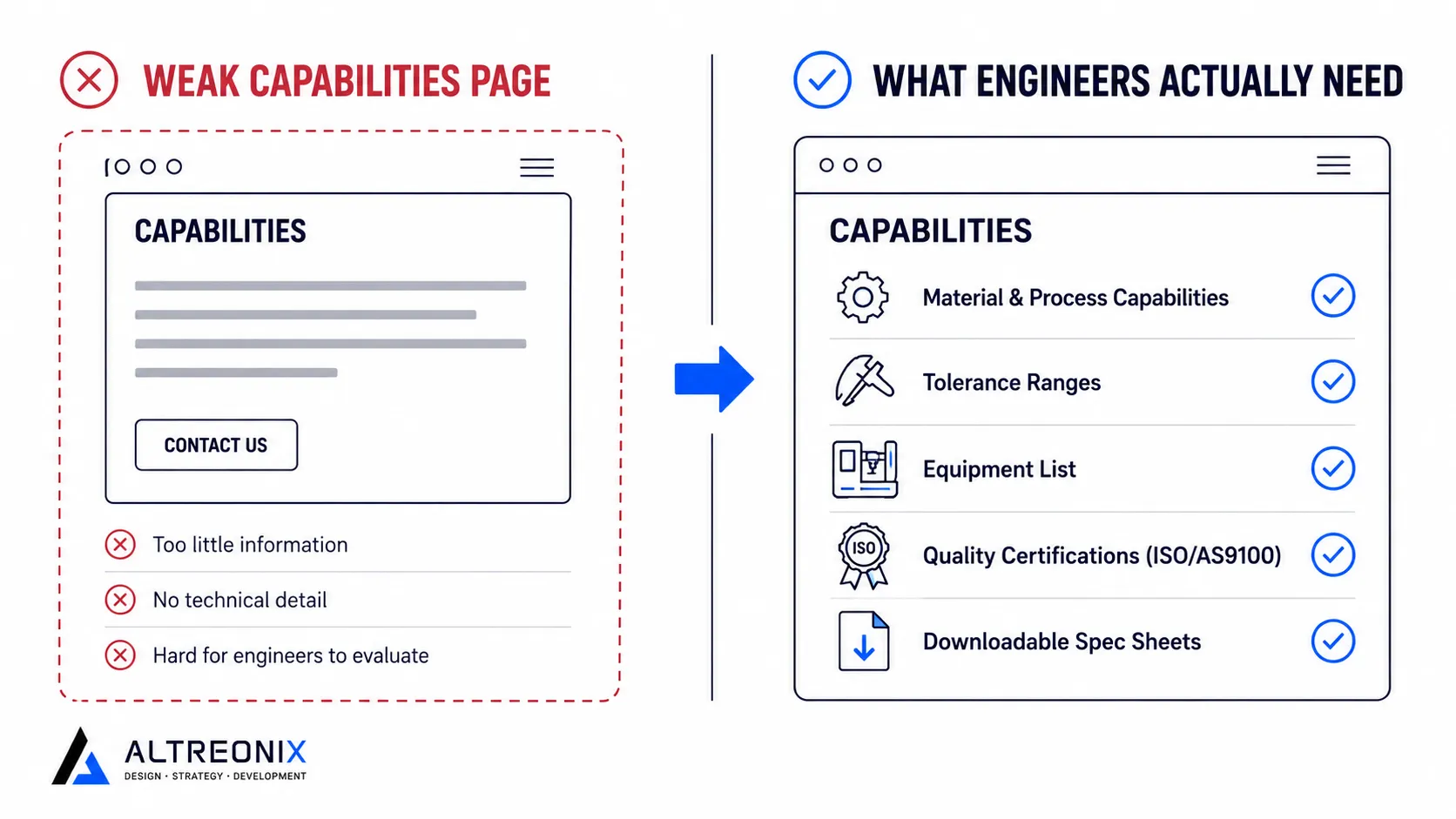
A capabilities page that actually converts needs to answer the questions a specifying engineer would ask on a discovery call, without making them ask:
Material and process capabilities. What can you actually machine, mold, fabricate, or assemble?
Dimensional and tolerance ranges. The specific numbers, not "precision manufacturing."
Equipment list. What machines, and what they are capable of.
Quality certifications. ISO 9001, AS9100, ITAR, RoHS, REACH, or sector-specific credentials, displayed prominently rather than buried in a PDF.
Downloadable technical documentation. Spec sheets a buyer can pull into their own evaluation without asking you for them.
A 2025 audit of industrial supplier websites, reported by YouFind Digital, found that most machinery component suppliers offered only partial operating data. One supplier relying on images and basic dimensions alone had a bounce rate of 78% within 30 seconds. Competitors offering calculators and full specs held visitor sessions of six minutes or longer.
2. No Technical Content
This mistake is quieter than a bad capabilities page, and arguably more expensive, because it affects whether your part gets specified into a customer's design in the first place, long before an RFQ is even possible.
DJS Research's survey of engineering buyers found datasheets are the single most valuable content type to engineers, ranked well above technical articles and customer reviews. Engineers are not browsing for inspiration. They are looking for:
Datasheets and dimensional drawings
Downloadable CAD models
Performance curves and technical specifications
Selection tools or calculators that help them solve a design problem
Without these, a part simply does not get "designed in" to a customer's assembly. And if it is never designed in, it never generates an RFQ, regardless of how competitive the pricing would have been.
The fix is architectural, not cosmetic. A resource library needs to sit inside the site structure itself, organized by product line or capability, so an engineer can self-serve exactly what they need without contacting sales first.
The Five Mistakes That Shrink Your RFQ Volume
These do not eliminate you outright the way the two mistakes above do, but each one quietly reduces how many of the buyers who do reach your site actually convert into a request for quote.
3. A Painful RFQ Experience
Getting a buyer to your quote form is the hard part. Losing them there afterward is avoidable.
Form analytics research covering tens of millions of sessions, reported by Pryce Digital, puts average form completion at roughly half of everyone who starts one. The pattern is consistent across studies:
Each field beyond the essentials reduces completion.
Forms with 10 or more fields lose the large majority of mobile visitors before submission.
Teams that cut long forms down to a handful of essential fields have documented conversion lifts well over 100%.
For manufacturers, the specific failure is treating an RFQ like a newsletter signup: no CAD upload, no material selection, no way to describe what is actually being quoted. Paperless Parts' case study on an additive manufacturing and CNC shop found that switching to an optimized digital RFQ workflow cut quote-to-order time from roughly 30 minutes down to 7, simply by removing the friction a generic form was creating.
A better structure segments by capability. CNC machining, injection molding, and sheet metal RFQs need different fields. Conditional logic that only shows relevant questions, paired with native file upload for CAD and drawings, converts significantly better than one long generic form.
4. Slow Website Performance
Engineers are not browsing. They are completing a task: check a tolerance, download a datasheet, cross-reference a part number. A slow page adds friction to an already narrow window of patience, and bounce probability rises sharply once load time crosses a few seconds.
SIS International's analysis of industrial e-commerce found that in categories like capital equipment, the digital channel now drives the majority of the consideration funnel, and slow or clumsy configurators push buyers toward faster competitors. Google's Core Web Vitals business impact case studies show measurable conversion gains once companies fix load time, a pattern that holds regardless of industry.
The fix here is usually the cheapest one on this list: a lean, purpose-built stack instead of a bloated page builder, compressed and lazy-loaded assets, and minimal third-party scripts.
5. No Proof of Expertise
TREW Marketing's engineering research found that the large majority of engineers say proven expertise in their specific application area is the deciding factor in vendor selection. A generic "About Us" page does not demonstrate that. A case study organized by industry does.
Thomasnet's guidance recommends structuring proof by vertical (automotive, medical, aerospace, and so on) rather than a single undifferentiated project gallery, because buyers are pattern matching for relevance to their own problem, not scanning for general competence.
6. Weak Trust Signals
DigiHotshot's research on procurement behavior found that procurement specialists often evaluate a supplier's website in under 90 seconds, scanning for visible certifications like ISO 9001, AS9100, ITAR, RoHS, and REACH, along with recognizable customer logos. Their absence raises perceived risk and can end the evaluation immediately.
Discovered Labs' research on B2B social proof found that trust signals placed near forms and key decision points can meaningfully lift B2B conversion rates. Placement matters as much as presence. A certification badge in a footer does less work than one positioned next to the RFQ button itself.
7. Generic Stock Photography and Outdated Design
Credibility judgments form almost instantly, driven by layout, imagery, and how current the design feels, before a visitor reads any copy at all.
For industrial buyers specifically, generic stock photography is worse than no imagery at all. It signals that a supplier is not showing the real operation. Thomasnet's guidance notes that buyers increasingly rely on facility photos and videos to assess modernity and workflow in place of an in-person site visit, a shift that accelerated as trade show reliance declined. Real equipment and shop floor imagery, not stock photos of hands typing on laptops, is what actually builds trust here.
What This Means for Your Website
The seven mistakes above are not independent problems to fix in isolation. They compound.
A fast site with no capabilities page still loses the buyer. A detailed capabilities page sitting behind a slow, ten-field RFQ form still loses the buyer. The manufacturers converting the most website traffic into RFQs are the ones treating the site as one connected system: fast, technically credible, trust-signaled, and backed by a quoting workflow that does not punish a buyer for showing interest.
If your site gets steady traffic from search, trade directories, or outbound, but RFQ volume has not moved, the pattern is almost always one or more of the mistakes above, not a shortage of demand.
We have also written more broadly about the design, SEO, and follow-up mistakes that kill conversion rates across industries, which is worth a read if some of this applies beyond manufacturing for your business.
For manufacturers specifically, we build custom websites for industrial and manufacturing businesses around exactly the structure this article describes: capability-first content, fast performance, and an RFQ process engineers actually want to use. If you want a clear read on where your own site is losing RFQs before anyone calls, that is a conversation worth having.